














Summary:
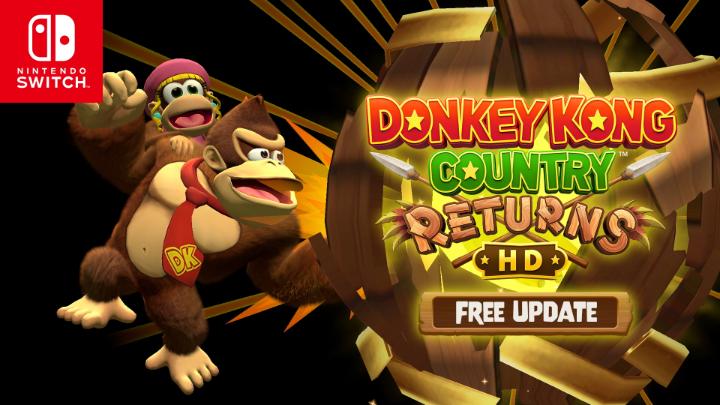
Version 1.1.0 for Donkey Kong Country Returns HD lands like a surprise banana stash – free, chunky, and packed with reasons to boot the game up again. The headline is simple: we can now play as Dixie Kong, and she is not just a cosmetic swap. Her jump behaves differently than Diddy’s, which changes how we read gaps, enemy patterns, and those “I can totally make that” moments that usually end with a dramatic fall. On top of that, the update adds smarter character control. In solo play, grabbing a barrel now lets us choose whether Diddy or Dixie appears, and in two-player sessions the second player can switch between them on the world map with a stick press. It sounds small until you’re actually coordinating with someone on the couch and you realize it removes a lot of fiddly friction.
The other big addition is Turbo Attack mode, a high-speed spin on stages that rewards clean execution. Once we clear a course, Turbo Attack shows up alongside Time Attack, and beating the time limit earns a turbo medal. That creates a fun loop: learn the level, then sprint it like you’re late for an appointment with Cranky Kong. The update also adds Brazilian Portuguese language support through the system language setting, plus a bundle of general fixes and image quality improvements. On Nintendo Switch 2 specifically, we get GameShare (Local User), optimization for the Switch 2 display and high-resolution TVs, and shorter loading times. Put it all together and this update does something rare – it improves how the game feels minute to minute, not just how it looks on a feature list.
Donkey Kong Country Returns HD Ver. 1.1.0
Ver. 1.1.0 is the kind of update that doesn’t just tweak a number in a corner of a menu – it changes how we actually play. Nintendo rolled it out as a free update on January 20, 2026, and it targets both Nintendo Switch and Nintendo Switch 2 with meaningful additions. That matters because platformers live and die on rhythm. If a new mode pushes us to move differently, or a new character changes how we jump and recover, the whole game gets a second heartbeat. This update brings that energy in a few ways at once: a new playable character, new switching options that reduce friction, and a new speed-focused mode that rewards clean movement. On Switch 2, it also leans into quality-of-life upgrades like GameShare support, improved image optimization, and shorter loading times. If we’ve ever loved this game but bounced off repeating the same routes, Ver. 1.1.0 gives us a reason to return without needing a brand-new release.

Dixie Kong is now playable
Dixie Kong joining the roster is the headline for a reason, because playable characters in a platformer are basically new tools in our hands. We’re not just swapping outfits – we’re changing how we approach risk. Nintendo notes that Dixie’s action when jumping is different from Diddy Kong’s, which signals that movement and recovery won’t feel identical. That one difference can ripple through the whole experience. A jump that hangs longer, shifts momentum, or offers a different type of control can turn a “barely possible” gap into something consistent, or it can tempt us into trying routes that were annoying before. It also adds personality to the way we play. Some players prefer a precise, snappy feel. Others like a more forgiving arc that lets them correct midair. Dixie gives us another style to lean into, and the best part is that we can experiment without committing to a separate save file or a separate mode.
How Dixie’s jump changes the feel of a stage
When a character’s jump changes, the stage doesn’t change on paper, but it changes in our hands. The platforms are the same size, the enemies stand in the same spots, and the gaps don’t magically shrink – yet our timing and confidence shift immediately. Dixie’s different jump action means we’ll re-learn micro-moments: when to leave the ledge, how early to commit, and how much we can adjust after takeoff. That can make familiar sections feel freshly dangerous in a good way, like running a path you know at night instead of in daylight. It also affects momentum through a level. A character who recovers differently can encourage more aggressive play, because mistakes become recoverable, or it can reward a calmer pace if the jump demands more planning. Either way, Dixie’s presence is a real gameplay change, not a novelty, and that is exactly what keeps platformers from feeling stale.
Switching partners in solo play when you grab a barrel
Solo play gets a smart quality-of-life tweak: when playing alone, grabbing a barrel now lets us switch between Diddy Kong or Dixie Kong as the character that appears. That small line in the patch notes has big practical impact because it puts choice right where we need it. Instead of feeling stuck with whichever partner the game hands us in the moment, we can decide based on the next stretch of the stage. Maybe we want to try a tricky run with one character’s jump style, then swap on the next barrel when the terrain changes. It’s like choosing the right shoes for the right trail – you can hike in anything, but the right fit makes the whole walk smoother. This also makes experimentation painless. We can test Dixie’s feel for a section, switch back if it’s not clicking, and keep moving without breaking the flow. In a game where momentum is everything, that’s a bigger win than it sounds.
Two-player switching on the world map
Local co-op is where a lot of platformers either become best friends forever or “we should take a break” simulators, and character control can tip the balance. In Ver. 1.1.0, when playing with two people, player two can switch between Diddy Kong or Dixie Kong by pressing the stick on the world map – specifically the L Stick when using both Joy-Con 2 or Joy-Con controllers. The important thing is the result: we can adjust who player two uses without turning the setup into a menu maze. That helps co-op stay light and fun, because swapping characters becomes a quick decision instead of a discussion that pauses the game. It also makes it easier to match play styles. If player two feels more comfortable with one option, they can pick it and stick with it. Less friction means more laughter, fewer “wait, what did I press,” and more time actually playing the levels.
Turbo Attack mode: speed runs with teeth
Turbo Attack mode adds a different kind of thrill – the “go, go, go” feeling where hesitation costs you. Nintendo describes it as a mode where we can race through the stage at high speed, which immediately changes what we prioritize. In a normal run, we might pause to line up a jump, grab everything in sight, or play it safe around an enemy. Turbo Attack pushes us to think like a runner instead of a collector. The stage becomes a track, and every mistake is a time penalty that hurts emotionally because we know it was avoidable. That’s the fun. It’s pressure, but it’s playful pressure, like racing a friend to the car in the rain. Turbo Attack also adds replay value because it turns familiar levels into performance challenges. Once we understand the “safe” route, we can chase the “fast” route. The same course suddenly has two identities, and that’s a great way to keep a platformer feeling alive.
How Turbo Attack unlocks and how turbo medals work
Turbo Attack is tied to progression in a straightforward way. Once we clear a course once, Turbo Attack appears at the same time as Time Attack mode. That design makes sense because it respects first-time players – we get to experience the level normally before the game asks us to sprint through it. From there, the challenge is clear: if we can clear Turbo Attack within the time limit, we acquire a turbo medal. Medals are a simple reward, but they tap into that “one more try” impulse that platformers do so well. We fail by a second, we blame the barrel timing, we laugh, and then we run it again. The structure also keeps Turbo Attack from feeling like a separate game. It’s layered onto the existing courses we already know, which means our learning carries over. The better we understand the level layout, the more Turbo Attack becomes about execution rather than guesswork.
Quick tips for Turbo Attack without losing your mind
Turbo Attack is fast, and speed makes small mistakes feel huge, so the first tip is to treat it like rhythm practice. We’re not trying to be perfect on attempt one. We’re trying to be consistent. Pick one section that keeps ruining the run and focus on cleaning that up, because shaving two seconds in one trouble spot beats shaving tiny fractions everywhere else. It also helps to commit to movement – hesitation is the silent killer in speed-focused modes. If we second-guess a jump, we usually lose more time than we save. Another practical tip is to learn where we can safely ignore optional paths. Turbo Attack isn’t asking us to sightsee – it’s asking us to finish. Finally, if we’re playing co-op, talk out the plan before launching. Nothing ends a run faster than both players trying to lead at once. Turbo Attack is chaos if we let it be, but it’s satisfying chaos when we get in sync.
Brazilian Portuguese language support
Language support might not sound as exciting as a new mode, but it’s a real quality upgrade for a lot of players. Ver. 1.1.0 adds Brazilian Portuguese language support, and Nintendo notes that we can switch the language in the “Language” setting in the “System” menu of “System Settings.” That means the option is handled at the system level rather than hidden in an in-game submenu, which is typical for many Switch releases and keeps things consistent across a library. This matters because platformers often communicate timing, mechanics, and feedback through short prompts and menus. When that text lands in a player’s preferred language, the game feels friendlier and more immediate. It’s also a signal that Nintendo is still refining and expanding accessibility for the game after release. Even if we personally play in English, more language options make the community bigger, and bigger communities tend to keep games alive longer through shared challenges, runs, and friendly competition.
Nintendo Switch 2 upgrades in this update
On Nintendo Switch 2, Ver. 1.1.0 isn’t just “the same update, but on newer hardware.” Nintendo includes Switch 2-specific improvements that touch how we share the game, how it displays on modern screens, and how quickly we get back into the action after a death or a restart. Those things matter more than raw specs because they change the feel of a play session. When loading times are shorter, failure hurts less and experimentation becomes more natural. When the image is optimized for the Switch 2 display and high-resolution TVs, we get a clearer picture of hazards and motion, which is a subtle but real advantage in a game built on timing. And when new sharing options like GameShare (Local User) show up, it becomes easier to turn a solo evening into a couch co-op moment. These are the kinds of upgrades that make the Switch 2 version feel like it belongs on the system rather than merely running on it.
GameShare (Local User) support
Ver. 1.1.0 adds support for “GameShare (Local User)” when playing on Nintendo Switch 2. Nintendo’s notes explain that we can select “GameShare (Local User)” from “2 Players” on the game start screen or from the menu screen on the world map. In plain terms, it’s a new local sharing option built into the Switch 2 experience, and Nintendo is placing it right where players already look when they want to play together. That placement matters because features only help if people can actually find them. From a practical standpoint, anything that makes local play easier is a win for a Donkey Kong platformer, because these games shine when one person is cheering and the other is panicking mid-jump. GameShare support also signals that Nintendo wants Switch 2 upgrades to be more than performance boosts. It’s about social play, quick setup, and reducing the “wait, how do we do this?” moments that can kill the vibe.
Display optimization and image quality improvements
Nintendo states that the game is optimized for the Nintendo Switch 2 display and high-resolution TVs for improved image quality. That’s a broad line, but the intent is clear: we should expect a cleaner, sharper presentation when playing on newer screens. In a platformer, clarity isn’t just about pretty visuals – it’s about reading the world quickly. Cleaner edges and improved image handling can make hazards easier to spot, foreground and background layers easier to separate, and motion easier to track when things get hectic. Nintendo also notes general “image quality enhancements” alongside other fixes, which suggests both versions benefit, while Switch 2 gets extra attention for its display pipeline. The result is a smoother experience where the game looks more at home on modern TVs. If we’ve ever played a remaster and felt like something looked slightly off on a big screen, optimization work like this is the kind of quiet fix that makes everything feel more natural.
Shorter loading times and the quality-of-life payoff
On Nintendo Switch 2, Nintendo says the loading time is now shorter. That sentence is short, but the payoff is big, especially in a game where retries are part of the fun. Faster loading means we spend less time waiting and more time playing, which is the whole point of picking up a platformer for “just a quick run.” It also changes how we practice. If a section is tough, we can retry more often without feeling like we’re fighting menus and loading screens as much as we’re fighting the level. That makes Turbo Attack mode more enjoyable too, because speed-focused challenges often involve repeated attempts. There’s also an emotional component: quick restarts keep momentum high. Instead of cooling off between runs, we stay locked in, and that’s when we play our best. Shorter loading times won’t show up in a screenshot, but they show up in how long we keep playing before we put the controller down.
Other fixes and small improvements
Beyond the headline features, Nintendo notes that several other issues have been addressed and that image quality enhancements have been made to improve the gameplay experience. These are the unsung parts of an update, because they usually target edge cases, stability hiccups, and small annoyances that players feel but can’t always explain. Fixes like these also help everything else land better. A new playable character is more fun when the game feels stable. A new mode is more rewarding when the visuals are clearer and the overall experience is smoother. Even if we don’t have a bullet-by-bullet list of every minor fix, the key takeaway is that Nintendo treated Ver. 1.1.0 as more than a feature drop. It’s also a refinement pass aimed at making sessions feel cleaner and more reliable, whether we’re playing on Switch or taking advantage of Switch 2 upgrades. In a platformer, reliability is comfort food – you don’t notice it when it’s perfect, but you miss it immediately when it’s not.
Conclusion
Ver. 1.1.0 gives Donkey Kong Country Returns HD a real second wind. Dixie Kong adds a fresh way to move and rethink familiar stages, and the new switching options make it easier to experiment without breaking flow. Turbo Attack mode turns completed courses into high-speed challenges with turbo medals as a clear reward, and that kind of loop is perfect for players who love mastering a level rather than just finishing it. The Brazilian Portuguese language option expands who can comfortably jump in, and the general fixes plus image improvements help the whole package feel smoother. On Nintendo Switch 2, GameShare (Local User), display optimization for high-resolution screens, and shorter load times make the game feel more modern and more social. If we were waiting for a reason to replay old favorites, Nintendo just handed us one – and it comes with a ponytail-powered jump.
FAQs
- When was Ver. 1.1.0 released for Donkey Kong Country Returns HD?
- Nintendo lists the update as released on January 20, 2026, and it’s available for both Nintendo Switch and Nintendo Switch 2.
- How do we switch between Diddy and Dixie in solo play?
- When playing alone, grabbing a barrel lets us switch between Diddy Kong or Dixie Kong as the character that appears, which makes testing each option quick and painless.
- How does player two switch characters in local co-op?
- In two-player play, player two can switch between Diddy Kong or Dixie Kong by pressing the stick on the world map – it’s the L Stick when using Joy-Con 2 or Joy-Con controllers.
- How do Turbo Attack mode and turbo medals work?
- After we clear a course once, Turbo Attack appears alongside Time Attack. If we clear Turbo Attack within the time limit, we earn a turbo medal.
- What are the Nintendo Switch 2-specific additions in this update?
- On Switch 2, Ver. 1.1.0 adds GameShare (Local User), optimization for the Switch 2 display and high-resolution TVs, and shorter loading times.
Sources
- How to Update Donkey Kong Country Returns HD, Nintendo Support, January 20, 2026
- Donkey Kong Country Returns HD Gets A Free Switch 2 Update And Adds Dixie Kong, Nintendo Life, January 2026
- Donkey Kong Country Returns HD 1.1.0 update out now, patch notes, Nintendo Everything, January 20, 2026
- Donkey Kong Country Returns HD version 1.1.0 update now available, adds Dixie Kong and Switch 2 enhancements, Gematsu, January 20, 2026
- Donkey Kong Country Returns HD Free Update Adds Playable Dixie Kong, GameShare Support, And More, NintendoSoup, January 2026