














Summary:
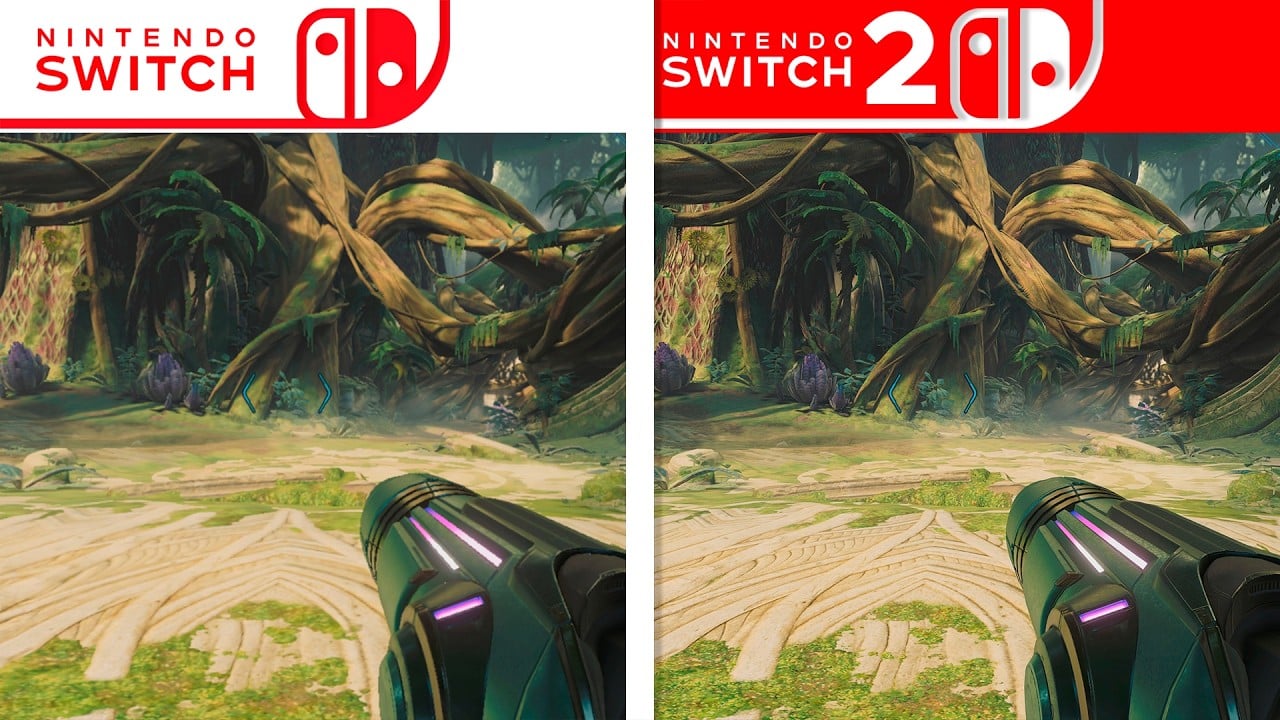
Metroid Prime 4: Beyond has finally landed on both Nintendo Switch and Nintendo Switch 2, and the latest graphics comparison taken from the finished game instead of old trailer footage finally shows what the paid Switch 2 Edition upgrade really delivers. Many players have been sitting on the fence, unsure whether the jump to Nintendo’s newer hardware or the extra fee for the upgrade pack is justified, especially when the original Switch version already looks and runs surprisingly well. The fresh side by side video makes it clear where the extra horsepower goes: sharper resolution, HDR support, smoother animation at higher frame rates, and noticeably snappier loading when hopping between rooms or reloading a save. At the same time, both versions share the same campaign, bosses, and structure, so you are not missing story beats or gameplay systems by sticking to Switch 1. We walks through how the comparison was captured, what actually changes between quality and performance modes, how the upgrade path works, and what happens if you use a Switch 2 Edition cart on a Switch 1. By the end, you should have a grounded sense of which version fits your setup, your budget, and the way you like to explore Viewros with Samus.
Why this new Metroid Prime 4 graphics comparison matters
The latest Metroid Prime 4: Beyond graphics comparison is the first one based on the finished game, which instantly makes it far more useful than older videos stitched together from trailers. Trailer footage is usually captured under perfect conditions, cherry picked angles, and sometimes even early rendering paths that change before launch, so what you see there does not always match what eventually runs on your TV. This new comparison uses the launch build with the day one patch installed and focuses on regular gameplay: entering rooms, fighting space pirates, exploring the forests of Viewros, and scanning ancient Lamorn ruins. For anyone wondering whether the Switch 2 Edition upgrade or even a full console jump is worth the money, seeing the exact same scenes side by side on Switch and Switch 2 takes away a lot of guesswork. The video also arrives right as reviews, tech breakdowns, and early player reactions are rolling in, so it slots neatly into that moment where everyone is deciding which version to buy, trade, or upgrade.

How the Switch vs Switch 2 gameplay capture was recorded
To make this comparison meaningful, the capture setup sticks closely to how people actually play Metroid Prime 4. Both consoles are typically docked, connected through the same capture device, and synced to show identical sections of the story, from early corridors in Federation facilities to open stretches of Viewros’ dense forests and harsher desert zones. The player repeats the same movements, enemy encounters, and weapon use on each system, often down to the same morph ball paths and scan targets. This method lets small differences jump out more clearly, like how foliage is rendered in the distance or how cleanly energy beams cut across the screen. In some sequences, the video also switches to handheld capture to show how the game scales on the original Switch screen compared to the larger 1080p display of Switch 2. By avoiding pre release code and sticking to the same patch level on both platforms, the comparison feels fair, and that matters when people are deciding whether a ten dollar upgrade pack or a full price Switch 2 Edition box earns a spot on their shelf.
Resolution, image quality and HDR on Switch and Switch 2
On a basic level, Metroid Prime 4: Beyond runs at up to 1080p on the original Switch when docked, with image quality that already holds its own for a hybrid system. Edges are generally clean, but you will notice some shimmering on thin geometry, soft foliage in the distance, and a layer of blur that keeps the image from looking razor sharp on big screens. On Switch 2, the paid Switch 2 Edition upgrade unlocks two visual modes that immediately change how the game looks. Quality mode targets 4K at 60 frames per second while docked and 1080p in handheld, feeding an HDR signal that makes bright charge shots, plasma glows, and explosions pop much more against the darker corners of Viewros. Performance mode hits 1080p at up to 120 frames per second on a capable TV, while handheld drops to 720p but still benefits from cleaner anti aliasing and HDR. Side by side, surfaces like Samus’ suit, metallic corridors, and foliage lines look crisper and better defined on Switch 2, and that difference becomes more obvious the larger your display gets.
Frame rate modes and performance on both systems
Frame rate is the other big pillar of this comparison, and the good news is that both versions of Metroid Prime 4 are designed around responsive controls and smooth motion. On the original Switch, the game aims for 60 frames per second and largely sticks to it, even in busier firefights where multiple enemies, particle effects, and environmental hazards share the screen. You might see short dips during the heaviest scenes, but they tend to be brief enough that most players will not notice unless they are watching graphs. On Switch 2, the Switch 2 Edition upgrade introduces that second performance mode that doubles the frame rate ceiling to 120 frames per second at 1080p while docked. This higher refresh rate makes quick camera flicks, precision shots using mouse style Joy Con 2 controls, and fast morph ball traversal feel incredibly responsive, especially on a TV or monitor that can match the signal. Quality mode on Switch 2 still holds closely to 60 frames per second at 4K, giving players a flexible choice between clarity and ultra smooth movement without sacrificing stability on either path.
Load times and streaming differences
Loading is one of those things you only really think about when it gets in your way, and that is where Switch 2 starts to flex a bit more. On the original Switch, Metroid Prime 4 already does a decent job of hiding loads behind door transitions and short fade outs when you move between major regions, but you can still feel a beat of waiting when reloading a save from the title screen or fast travelling between key locations on Viewros. In the gameplay comparison, those pauses shrink noticeably on Switch 2. Jumping into a save, retrying after a tough boss, or moving between dense areas like jungle hubs and underground labs tends to complete more quickly, so you are back to exploring and scanning before your mind drifts to your phone. Asset streaming also feels more confident, with distant objects, foliage clusters, and shadow details popping in less aggressively on Switch 2. The net effect is not magical teleportation, but it does make the rhythm of play feel more fluid, especially over long sessions.
Visual upgrades beyond resolution, lighting, effects and textures
Although resolution and frame rate grab the headlines, there are smaller visual tweaks that show up once you spend time pausing the footage or replaying sequences. On Switch 2 in quality mode, lighting often feels richer, with more defined highlights dancing across Samus’ armor and a slightly deeper contrast between pools of light and shadow in interior spaces. Texture work gains a subtle lift too: rock faces on Viewros, metallic panels on Federation equipment, and ornate Lamorn carvings look more detailed when viewed up close, thanks to higher resolution assets and the sharper overall image. Effects like particle trails, energy blasts, and atmospheric fog also appear cleaner, with less banding and fewer aliasing artifacts at distance. None of these upgrades reinvent Metroid Prime 4’s art direction, which already leans on strong design rather than flashy tech, but together they make the Switch 2 Edition feel closer to what your brain imagines when you think of a modern high definition Metroid adventure.
How the paid Switch 2 Edition upgrade works
For anyone starting on the original Switch, the Switch 2 Edition upgrade is the bridge that lets you bring your existing copy of Metroid Prime 4 into the Switch 2 era without buying the whole game again at full price. If you own the digital Switch version, you can purchase a separate Switch 2 Edition upgrade pack from the eShop, which unlocks the higher resolution modes, HDR output, 120 frames per second performance setting, and mouse style aiming when you run the game on a Switch 2. The underlying campaign, difficulty options, and unlockable secrets remain identical, so your money goes into presentation and feel rather than extra missions or exclusive weapons. Pricing sits well below the full cost of a new game, roughly the price of a small DLC pack, which makes it easier to justify if you just picked up a Switch 2 and want your existing Samus adventure to show off the new hardware. Once the upgrade is tied to your account, it travels with your digital license, so you do not have to juggle separate apps or storefront entries for each console.
Physical carts, cross compatibility and save data
Physical buyers have their own decisions to make, and this is where the Switch 2 Edition branding on boxes and carts comes in. Metroid Prime 4 is sold as a regular Switch release and as a Nintendo Switch 2 Edition release, with both versions sharing the same core adventure but targeting different feature sets. Switch 1 copies run on both consoles by design, taking advantage of backwards compatibility on Switch 2 while sticking to the original 1080p and 60 frames per second targets. Switch 2 Edition carts, on the other hand, are built to showcase the upgraded hardware while still retaining compatibility with the older system, so you can pop the same cart into a Switch 1 and play the base experience there too, just without the higher resolutions, HDR, and extra performance mode. Save data can be moved between systems using Nintendo’s transfer tools or cloud backup where available, which means you can start your run on a trusty launch Switch and then carry that same file over when you upgrade the console or the edition later on.
Which version suits your setup and budget
Choosing between the Switch and Switch 2 versions of Metroid Prime 4 mostly comes down to three things: the screen you are using, how sensitive you are to smoothness, and how much you want to spend right now. If you play mostly in handheld on a Switch 1 and do not own a 4K or 120 Hz display, the standard version will already feel like a polished, stable adventure that does justice to Samus’ return. The Switch 2 Edition shines brightest when you can feed a 4K HDR signal into a capable TV or monitor and actually see the benefit of that higher resolution and wider dynamic range, or when you really appreciate the buttery feel of 120 frames per second aiming in performance mode. The paid upgrade pack hits a sweet spot for people who already own the game digitally and have recently picked up a Switch 2, acting like a reasonably priced visual enhancement rather than a full repurchase. If your budget is tight and you are still on a Switch 1, there is no shame in sticking with that version now and only worrying about the upgrade if and when your hardware changes.
For Metroid fans still on Switch 1
For long time Metroid fans who have not jumped to Switch 2 yet, the key takeaway from this comparison is that Metroid Prime 4: Beyond is not leaving you behind. The original Switch version holds up strongly, with solid performance, atmospheric visuals, and all of the same story beats, upgrades, and boss encounters that players on newer hardware enjoy. The Switch 2 Edition upgrade exists to polish the experience rather than to split the community, layering sharper resolution, HDR, faster loading, and higher frame rate options on top of a shared core. The new graphics comparison video from final code makes that relationship clear: Switch 2 absolutely gives Beyond more clarity and smoothness, but it does not turn the older version into a compromise you need to feel bad about. That is good news if you are still saving for new hardware or simply happy with the hybrid you already own. When you do eventually move on, your knowledge of Viewros, your save file, and your familiarity with Samus’ psychic abilities will travel with you, and the Switch 2 Edition upgrade will be waiting to give that familiar journey a cleaner, smoother coat of paint.
Conclusion
Metroid Prime 4: Beyond lands in an unusual but player friendly spot, offering a strong version on the original Switch and a visibly refined take on Switch 2 without locking major pieces of the adventure behind the newer hardware. The latest side by side comparison built from live gameplay puts real footage behind the marketing promises, showing how sharper resolution, HDR, and higher frame rates on Switch 2 translate into cleaner vistas, smoother firefights, and shorter waits between action beats. At the same time, the paid Switch 2 Edition upgrade behaves more like a visual enhancement pass than a paid remaster, letting existing owners bring their copy and their progress forward at a reasonable price. Physical carts, digital licenses, and save transfers all work together to keep the experience flexible across both consoles. In practice, that means you can enjoy Samus’ fight across Viewros today on whatever system you own, then turn to the Switch 2 Edition when your setup, your budget, or your curiosity nudges you toward seeing Metroid Prime 4 at its best.
FAQs
- Does Metroid Prime 4: Beyond look dramatically different on Switch 2?
- The difference is noticeable but not a total overhaul. The Switch 2 Edition focuses on higher resolution, HDR support, and smoother frame rates rather than brand new assets or effects. On a 4K HDR display, edges look cleaner, colors have more punch, and motion feels more fluid, especially in performance mode, but the core art style and scene layouts remain the same across both systems.
- Is the paid Switch 2 Edition upgrade worth buying if I already own the Switch version?
- If you have a Switch 2 and a good TV or monitor, the upgrade is an appealing quality boost at a much lower price than rebuying the game. You keep the same campaign and save data while gaining 4K quality mode, 120 frames per second performance mode, HDR, and improved aiming options. If you are still on a Switch 1 or play mostly in handheld, the standard version is already strong and the upgrade can comfortably wait.
- Can I use a Metroid Prime 4 Switch 2 Edition cart on my original Switch?
- Yes, Switch 2 Edition releases are designed to stay compatible with the original Nintendo Switch. If you put a Switch 2 Edition cart of Metroid Prime 4 into a Switch 1, you can still play the game there, but it will run with the original feature set and target resolutions. The extra visual modes and HDR output only appear when that same cart is used on a Switch 2 system.
- Do I lose my save data if I move from Switch to Switch 2 or buy the upgrade pack?
- No, you can move your progress across. Nintendo’s system transfer tools and cloud backup options let you bring your Metroid Prime 4 save from a Switch 1 to a Switch 2, and once the data is there you can continue your playthrough using the Switch 2 Edition features. It is still wise to back up manually before major changes, but the process is designed so you do not have to restart the adventure.
- Which version should I buy if I have both consoles but only want one copy?
- If you own both a Switch 1 and a Switch 2 and plan to move between them, the Switch 2 Edition route makes the most sense. A Switch 2 Edition cart can still be used on an original Switch, and a digital copy with the paid upgrade plays on both systems under your account. That way you get the best experience possible on Switch 2 while keeping the flexibility to dock or go handheld on whichever console is free.
Sources
- Metroid Prime 4: Beyond, Wikipedia, December 4, 2025
- Metroid Prime 4: Beyond – Nintendo Switch 2 Edition Upgrade Pack, Nintendo.com, December 4, 2025
- Metroid Prime 4: Beyond – Nintendo Switch Games Overview, Nintendo.nl, December 4, 2025
- Video: Metroid Prime 4: Beyond Stuns On Switch 2 In This Side-By-Side Comparison, Nintendo Life, December 3, 2025
- Metroid Prime 4 Is Switch 2’s First True 120Hz 3D Showcase, Digital Foundry, December 3, 2025
- Should You Pay The Extra For Metroid Prime 4: Beyond Switch 2 Version?, Adventure Gamers, December 4, 2025
- Video: Metroid Prime 4: Beyond Switch Vs Switch 2 Final Graphics Comparison, NintendoSoup, December 3, 2025