














Summary:
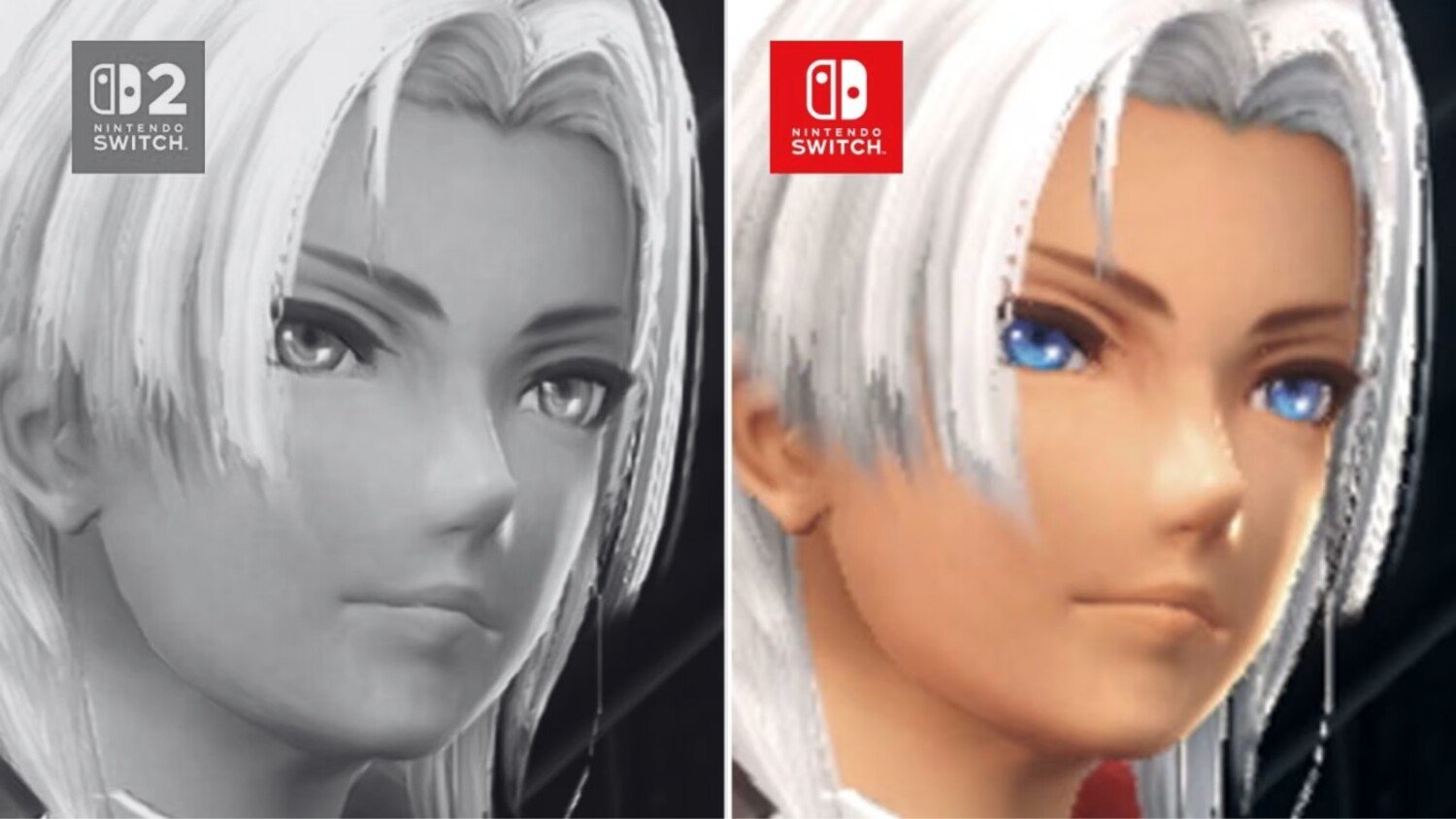
Nintendo’s surprise Switch 2 Edition upgrade for Xenoblade Chronicles X: Definitive Edition sounds simple on paper: pay a small fee, unlock higher resolution targets and smoother performance, and enjoy Mira with fewer rough edges. The problem is that a growing number of players say the upgrade doesn’t feel like a clean win, especially in handheld mode. Instead of “crisper,” the experience some describe is “smudgier,” with hints of aggressive upscaling that can soften textures, add halos around characters, and make distant detail shimmer in a way that pulls your eyes away from the adventure. When a game is built on huge vistas and long sightlines, tiny image quirks don’t stay tiny for long.
That frustration has led to something even more unusual: refund chatter. Nintendo’s digital purchase policies are typically strict, yet multiple reports claim refunds are being granted for this specific upgrade when people cite image-quality problems. A Reddit post describing a successful refund request has been widely shared, and coverage from major outlets has amplified the story. At the same time, not everyone agrees on the severity. Some players say docked play looks and feels great, while others insist the upgrade underdelivers compared to expectations for a paid add-on. That split is exactly why the best move right now depends on how you play, what you notice, and how allergic you are to visual artifacts.
We’re going to keep it practical. We’ll break down what Nintendo says the upgrade is meant to do, why handheld complaints are so common, what to test on your own system so you’re not relying on someone else’s screenshots, and how refund requests are reportedly being handled. If you were about to hit “purchase,” this is the pause button you’ll be glad you pressed.
What changed with the Xenoblade Chronicles X: Definitive Edition Switch 2 Edition upgrade
Nintendo positions the Switch 2 Edition upgrade for Xenoblade Chronicles X: Definitive Edition as a straightforward enhancement: improved performance and higher resolution targets, including support for enhanced resolutions up to 4K in TV mode and improved performance up to 60 fps. That wording matters, because it sets expectations without promising that every moment will be perfectly sharp and perfectly locked. Still, for a game famous for big landscapes, dense UI, and hectic combat, the appeal is obvious. Higher resolution should make fine detail cleaner, and a higher frame rate should make movement feel less “sticky,” especially during fast repositioning and camera spins. In other words, the upgrade is supposed to feel like polishing a foggy window, not swapping the glass for something wavier. The controversy is happening because some players feel the opposite: they expected clarity and got something that looks processed, like a photo that’s been run through a filter one too many times. When that’s the first impression, it’s hard not to wonder what exactly changed under the hood, and whether the trade-offs were worth charging for.
Why players are upset
The backlash isn’t about one tiny nitpick. It’s about a mismatch between what people think they’re paying for and what they believe they received once they started playing. Several reports describe image-quality regression, with complaints that textures appear softer, edges look artificially outlined, and distant geometry shimmers more than expected. The emotional part is easy to understand: when you pay for an upgrade, you’re not buying “different,” you’re buying “better.” And “better” is usually felt in the first five minutes, not after you squint at comparison footage. Add the fact that Xenoblade Chronicles X is a game where you spend a lot of time scanning horizons, looking for landmarks, and appreciating scale, and image quality isn’t just a cosmetic bonus – it’s part of the fantasy. If the world starts to look like it’s being reconstructed on the fly, it can break immersion. That’s why the complaints have teeth, and why they’ve spread fast across social platforms and comment sections: people are describing a very specific kind of disappointment that’s hard to unsee once you notice it.
The handheld problem players keep circling back to
Handheld mode is where the loudest frustration shows up. Players describe the upgrade as looking blurrier than expected on the smaller screen, with an “AI upscaling” vibe that can create halos around characters and make fine texture detail look smeared. Even if the performance is smoother, the look can feel less natural, and that trade-off hits harder in a portable setup where you’re closer to the screen and more likely to notice shimmering edges in motion. Some discussions also warn others to avoid handheld play until visuals are improved, which is a big deal for a Switch-style ecosystem where portability is half the identity. If you’re someone who plays on the couch, on the train, or in bed, you don’t want the upgrade to become a “docked-only” purchase. And if a paid add-on makes your usual playstyle feel worse, the annoyance isn’t petty – it’s logical. The key point is that these complaints are consistent in theme: not “the game is unplayable,” but “the image processing makes it look worse than it should,” which is exactly the kind of problem that pushes people toward refund requests rather than simple shrugging.
Docked mode: why opinions split so hard
Docked play is where the conversation gets messy, because experiences and tolerance levels diverge. Some players and outlets describe the docked results as looking and running great overall, which suggests the upgrade can deliver a satisfying improvement in the right setup. Others still report softness, pop-in, or shimmering, especially when the camera is moving quickly across detailed terrain. This split can happen even when everyone is telling the truth. Different TVs, different sharpening settings, different viewing distances, and different sensitivity to artifacts can make the same output feel either “finally crisp” or “oddly processed.” It’s like arguing about whether a restaurant is loud: someone wearing noise-cancelling earbuds is going to have a different night than someone sitting under a speaker. The practical takeaway is that docked mode may reduce the frustration for many players, but it hasn’t eliminated the controversy, because the complaints aren’t only about resolution numbers. They’re about how the game reconstructs detail, and whether the result looks natural. If you’re picky about image quality, you’re not alone, and docked mode isn’t guaranteed to settle it.
Refund reports and what they actually mean
Refund chatter is the wildfire fuel here, because it signals that the dissatisfaction isn’t just loud – it’s actionable. Nintendo’s public-facing policy language around digital purchases is generally strict, so when players claim they received refunds for a specific upgrade, it reads as an exception driven by a quality complaint rather than a casual change of mind. Multiple outlets have reported on the situation, and the story keeps pointing back to the same idea: people contacted Support, cited image-quality issues, and were granted a refund despite the usual stance on digital items. That doesn’t mean every request will be approved, and it doesn’t mean Nintendo has made a sweeping policy change. It does suggest something more interesting: that Support may be treating the situation as a known issue worth accommodating, at least in certain regions or cases. For players, that can be reassuring and frustrating at the same time. Reassuring because it implies Nintendo is listening. Frustrating because you’d rather have a clean upgrade than a customer-service workaround.
The Reddit refund story that kicked the hornet’s nest
The most shared example comes from a Reddit user who described requesting a refund specifically because the upgraded version’s image quality looked worse than the original. The post lays out a simple path: use the “Contact us” route on Nintendo’s site, open a chat with Support, explain that you want the refund due to image-quality problems, and wait for the refund to be processed back to your Nintendo account balance. The reason this resonated is not just the refund itself, but the framing. It wasn’t “I didn’t like it.” It was “the upgrade introduces a visual issue that makes the experience worse,” which is a fundamentally different kind of complaint. That distinction matters in how Support teams often evaluate exceptions. The post also encouraged others to request refunds as a way to send a message that paid quality should meet a higher bar. Whether you agree with that tactic or not, the post became a reference point, because it offered a concrete story in a situation filled with vague frustration. Once people see a clear path, they’re more likely to try it.
What people say they told Support
The consistent theme in successful refund stories is specificity. People say they pointed to image-quality degradation, not buyer’s remorse. They describe issues like blurriness, odd halos, shimmering, or a general sense that the upgraded presentation looks worse than the non-upgraded version. This kind of phrasing focuses the conversation on product performance rather than preference. It also aligns with how many companies handle exceptions: “this doesn’t function as expected” tends to land differently than “this isn’t for me.” Another common detail is that players report using live chat as the fastest route, and that refunds were applied back to the Nintendo account rather than a direct card reversal in the moment. The important nuance is that these are user-reported experiences, not a universal promise. Still, the repeating pattern across posts and coverage suggests that, if a refund is granted, it’s often tied to describing the visual problem clearly and keeping the request grounded in that issue rather than turning it into a broader rant about pricing or disappointment.
Why refunds can be inconsistent
Even when lots of people report success, inconsistency is normal for refunds, especially across regions. Support processes differ by country, consumer law differs by region, and even within the same region, outcomes can vary based on account history, timing, and the exact way the issue is described. There’s also a quieter factor: the difference between an official policy page and what Support can do in exceptional cases. A policy can say “we are unable to provide refunds,” while Support still has tools to resolve edge cases when a product issue is being escalated. That doesn’t make the policy fake – it makes it a default rule with occasional exceptions. If you’re in Europe, you may also see different outcomes than someone contacting North American Support, and some community discussions already suggest that experience can vary. The most grounded expectation is this: a refund may be possible for some players right now, but it’s not guaranteed, and it shouldn’t be treated like a built-in feature of the upgrade purchase.
How to check if you’re seeing the issue
If you’re trying to decide whether the complaints apply to you, the best move is to run a few simple tests that reveal the kinds of artifacts people are describing. The goal isn’t to turn your living room into a lab. It’s to answer one question: does the upgraded presentation look natural to your eyes, on your screen, in your usual playstyle? Start by testing both handheld and docked if you use both. Then focus on scenes with distant detail, moving foliage, fine texture patterns on terrain, and character edges against complex backgrounds. Those are the situations where upscaling artifacts, shimmering, and haloing tend to show themselves. Pay attention to motion, not just still frames. A still screenshot can look fine, while motion reveals crawling edges and shimmering that makes the image feel unstable. If you do notice something off, try toggling TV settings like sharpening and noise reduction, because those can exaggerate processing artifacts. This isn’t about blaming your TV. It’s about avoiding a setup that makes the problem look worse than it is.
Quick visual tests that reveal upscaling artifacts
First, find a viewpoint with long sightlines – cliffs, open plains, city edges, or anywhere you can see layered mountains and thin geometry lines in the distance. Slowly pan the camera left and right and watch the far background. If the distant detail “sparkles” or flickers, that’s the shimmer people complain about. Next, focus on character outlines against a busy background, like trees or complex structures. If you see a faint glow or outline that doesn’t look like intentional lighting, that can be the halo effect people describe. Then check ground textures while moving forward at a steady pace. If detail looks like it’s being painted in and out, or if the texture clarity seems to pulse, that can indicate reconstruction artifacts. Finally, do the same tests in handheld mode, because that’s where many players say the issue is most obvious. If everything looks clean to you, great. If it looks “processed,” you’ve found the reason the conversation is so heated.
Performance checks that matter in real play
Frame rate talk can get abstract fast, so keep it practical. Find a combat-heavy area where the camera swings quickly and enemies and effects stack on-screen. Pay attention to how responsive the camera feels and whether motion looks smooth or jittery. If the upgrade delivers a stable, higher frame rate, you should feel it immediately in how aiming and repositioning behave. Another useful check is traversal: sprint through a detailed zone and watch for sudden dips or hitching. A smoother experience can make Xenoblade Chronicles X feel more modern, even if the underlying design is older. That’s why some players still like the upgrade despite image-quality complaints. They value smoothness more than pixel-perfect clarity. The key is to weigh your priorities honestly. If you’d rather have a buttery camera and faster-feeling play, you may tolerate some softness. If visual clarity is your north star, performance gains won’t fully compensate for an image that looks artificially reconstructed.
Buy now or wait
This is the fork in the road, and the right choice depends on how you play and what you notice. If you’re sensitive to image artifacts, play mostly in handheld, or hate the idea of paying for something that feels like a gamble, waiting is the calmer option. Waiting doesn’t mean abandoning the idea. It means letting the situation settle so you can see whether Nintendo or Monolith Soft adjusts the visual presentation, or whether the community consensus shifts once more technical breakdowns and patches appear. On the other hand, if you play mostly docked, prioritize smoother motion, and are comfortable evaluating the upgrade with your own eyes, buying now can still make sense. The main mistake is assuming everyone’s experience will match the loudest posts. The second mistake is assuming the upgrade is automatically fine because it’s official. Right now, it’s a coin flip of perception: some people love it, some people feel burned. Your job is to decide whether you want to be part of the early wave or the later, safer wave.
When the upgrade still makes sense
The upgrade can be worth it if you primarily play docked and you care most about performance feeling smoother. If you’ve already invested in Xenoblade Chronicles X: Definitive Edition and you know you’re going to spend dozens of hours roaming Mira, even small improvements in motion and responsiveness can add up. For some players, a higher frame rate makes the world feel less like it’s dragging a heavy coat behind it. Another reason it can make sense is curiosity: you want to see the Switch 2 Edition version for yourself and you’re comfortable making a decision based on your own setup rather than online clips. If you fall into that group, the smartest approach is to test early, in the exact modes you’ll use long-term, and decide quickly whether the image looks acceptable to you. If it does, you’ll probably enjoy the smoother feel and move on. If it doesn’t, you’ll know you’re not imagining things, and you can make a more confident choice about whether to pursue a refund or simply wait for potential improvements.
When holding off is the smarter move
Waiting is smarter if handheld is your main way to play, or if you know visual softness and shimmering will bug you every time you pan the camera. It’s also smarter if you’re the type of player who hates messy uncertainty. Right now, the conversation is still volatile, with people posting contradictory impressions and comparing footage that may not match your own screen and settings. If you’d rather avoid that stress, pause. Another reason to wait is the refund uncertainty. Even if refunds have been granted for some players, it’s not guaranteed, and nobody should buy an upgrade assuming they’ll be able to undo it easily. Waiting lets you avoid needing Support at all. And honestly, there’s a psychological bonus: it feels better to buy something when the vibe is “this works,” not “this might work unless you notice the thing everyone’s arguing about.” If you were already happy with the base version, waiting costs you nothing but time, and it may save you a headache.
What Nintendo has promised for the upgrade
On Nintendo’s official listing for Xenoblade Chronicles X: Definitive Edition – Nintendo Switch 2 Edition, the upgrade is framed around enhanced resolutions up to 4K in TV mode and improved performance up to 60 fps. That’s the promise players are measuring their experience against, and it’s why image-quality complaints sting. People aren’t expecting miracles, but they are expecting the “enhanced” part to feel like an upgrade, not a trade where performance is bought by sacrificing clarity. It’s also worth noting that the listing clarifies practical compatibility details: the Switch 2 Edition features are tied to playing on the new hardware, and owners of the Switch version can purchase an upgrade pack to access the Switch 2 Edition. That’s a clean, consumer-friendly structure in theory. The tension is purely in execution and perception. If the upgrade delivers smoother play and a sharper look on your setup, it matches the spirit of the promise. If it delivers smoother play but a more processed image, some players will feel the promise was met in numbers but missed in feel. In a series where atmosphere and scale do so much heavy lifting, “feel” is not a small thing.
Conclusion
The Switch 2 Edition upgrade for Xenoblade Chronicles X: Definitive Edition has landed in a strangely divided place: it’s marketed as a simple enhancement, yet a noticeable slice of players say the image looks worse, especially in handheld play. That gap between expectation and experience is why refund reports have become part of the story, and why so many people are advising caution. If you’re tempted to buy, treat it like trying on shoes, not ordering a mystery box. Test the exact modes you actually use, in scenes where artifacts show up, and decide based on your eyes rather than someone else’s screenshots. If it looks great to you, you’ll likely enjoy the smoother feel and move on with your life. If it looks processed, you’ll understand immediately why the complaints are so loud. For anyone who plays mostly handheld or is picky about clarity, waiting is the least stressful option until the situation becomes more consistent. Either way, the message from the community is clear: when an upgrade is paid, “better” should be obvious, not debatable.
FAQs
- What are players complaining about with the Switch 2 upgrade?
- Many complaints focus on image-quality issues such as increased blurriness, shimmering in distant detail, and halo-like outlines, with handheld play mentioned most often as the trouble spot.
- Does the upgrade improve performance?
- Nintendo’s listing highlights improved performance up to 60 fps, and some players and outlets report smoother play, even while others remain unhappy with how the image is being processed.
- Are refunds actually happening?
- Multiple reports, including a widely shared Reddit account and coverage from major outlets, claim refunds have been granted in some cases when people cite image-quality problems, but outcomes can vary by region and situation.
- How can you tell if you’re seeing the problem?
- Test both handheld and docked modes in areas with long sightlines and lots of fine detail, then slowly pan the camera and watch for shimmering, texture smearing, or unnatural outlines around characters and objects.
- Should you buy the upgrade now or wait?
- If you mostly play handheld or you’re sensitive to visual artifacts, waiting is the safer choice. If you mostly play docked and value smoother motion, it may still be worth evaluating on your own setup.
Sources
- Xenoblade Chronicles X: Definitive Edition saddens JRPG fans with “really disappointing” Switch 2 upgrade – and Nintendo is apparently offering refunds, GamesRadar+, February 23, 2026
- Fans Are Asking Nintendo To Refund Xenoblade Chronicles X’s Switch 2 Upgrade, Nintendo Life, February 23, 2026
- Nintendo is refunding Xenoblade X upgrade patch, Reddit (r/Xenoblade_Chronicles), February 21, 2026
- Xenoblade Chronicles X: Definitive Edition – Nintendo Switch 2 Edition, Nintendo UK, February 19, 2026
- Xenoblade Chronicles X is $20 off in time for its Switch 2 upgrade, The Verge, February 19, 2026