














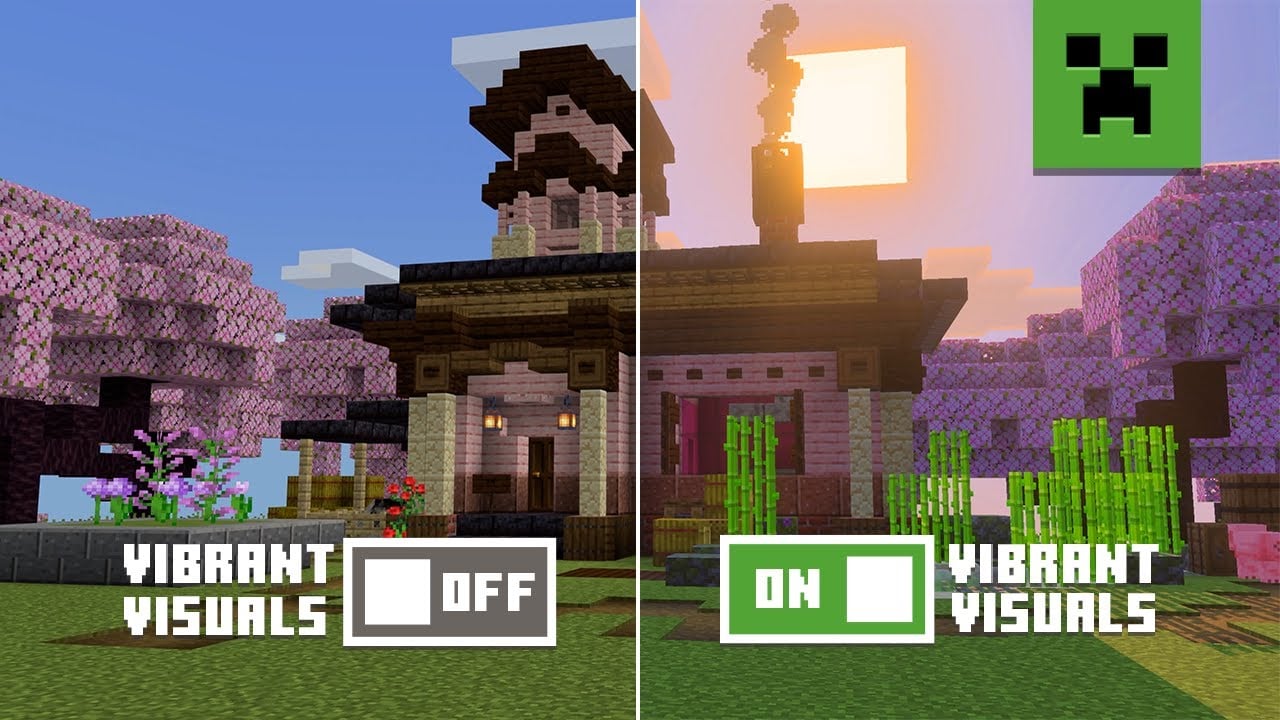
Summary:
The Vibrant Visuals update lands in Minecraft on June 17, breathing new life into every biome with advanced lighting, richer textures, and cinematic shadows. Exclusive to Bedrock Edition at launch, the upgrade introduces directional lighting, volumetric fog, and subtly reflective surfaces that make water shimmer and caves feel alive. While gameplay remains untouched, players will notice a dramatic difference the moment they step into the Overworld. This guide walks you through everything—from supported platforms to performance tips—so you can jump in on day one without a hitch. We also explore community reactions, outline what Java players can expect next, and share practical advice for protecting your worlds before toggling the new graphics. By the end, you’ll know exactly how to unlock Minecraft’s most vibrant look yet.
What Is the Vibrant Visuals Update?
The Vibrant Visuals update is Mojang’s first in-house graphical overhaul designed to modernize Minecraft’s charming blocky style without sacrificing performance or compatibility. Rather than tacking on a separate “fancy mode,” the developers infused the entire Bedrock engine with dynamic lighting, subtle reflections, and denser textures that honor the game’s iconic pixel art. Think of it as adding a fresh coat of paint to a beloved childhood treehouse: it still feels like home, yet every corner seems brighter and more alive. Under the hood, new render pipelines handle real-time light bounces and volumetric fog, making sunsets glow and deep caves feel genuinely foreboding. Importantly, Mojang stresses that Vibrant Visuals is purely cosmetic—your mob farms, daylight detectors, and redstone contraptions will behave exactly as before.
Release Date and Supported Platforms
Mark your calendar: the update drops worldwide on Tuesday, June 17, 2025, rolling out simultaneously across Xbox Series X|S, Xbox One, PlayStation 5, PlayStation 4, Windows 10/11, Android, and iOS via the Bedrock branch. Nintendo Switch players receive a separate trailer because the hybrid console’s hardware can’t yet run the new visuals at a stable frame rate, though standard gameplay features still arrive on schedule. Java Edition fans will need to wait a little longer; Mojang has confirmed that a dedicated Java graphics pipeline is in development but isn’t ready for public testing. In short, if you play on Bedrock and own a reasonably recent device, you’ll see the upgrade the moment you install version 1.22.
Key Graphical Improvements
So what exactly changes when you flip the Vibrant Visuals switch? Mojang highlights five pillars: directional lighting, enhanced textures, reflective surfaces, volumetric fog, and adaptive cloud rendering. Directional lighting means torches now cast soft fades rather than flat circles, producing gentle gradients on walls. Enhanced textures add extra pixel depth—wood planks reveal subtle grain, and grass blocks sport layered blades instead of a single green hue. Reflective surfaces let water mirror skylight and lava flicker menacing glints on cave ceilings. Volumetric fog thickens in swamps at dawn yet lifts by midday, creating dynamic atmospheres. Finally, adaptive clouds respond to time-of-day lighting, so a crimson sunset paints the sky and water in matching tones. Together these tweaks preserve Minecraft’s signature look while nudging it closer to modern sandbox competitors.
Directional Lighting and Shadows
Remember the first time you placed a torch underground and everything felt oddly flat? Directional lighting fixes that. Each light source now angles its rays, producing shadows that stretch and bend over blocks instead of emitting a perfect circle. If you build a medieval castle, the flicker of lanterns will dance across stone arches, adding depth that screenshots never quite captured before. The system also calculates soft penumbras around edges, so shadows fade gradually rather than ending abruptly. While it isn’t full path tracing like high-end shaders on PC, the technique hugs performance targets on consoles and mobile devices—most players report frame rates within five percent of pre-update numbers during beta tests.
Enhanced Textures and Reflective Surfaces
Texture resolution remains 16×16 pixels, staying true to Minecraft’s roots, but Mojang sneaks in parallaxed color grading to fake extra depth. Wood appears weather-worn, cobblestone looks chipped, and ores sparkle a little brighter when set into a mountain wall. Reflective materials tie it all together: water reads ambient skylight, creating ripples that shimmer under midday suns, while polished deepslate catches torchlight in underground halls. The reflections are screen-space—meaning only visible surfaces reflect—so the game avoids costly ray-tracing calculations. On Xbox Series X and high-end PCs, an “Ultra Reflection” toggle adds extra bounce passes for richer highlights, though it can nudge VRAM usage upward. Casual players on tablets can comfortably leave it at “High” and still notice a dramatic difference.
Volumetric Fog and Atmospheric Effects
Fog was once a simple draw-distance trick; Vibrant Visuals reimagines it as a storytelling device. Step into a swamp at dawn and watch wisps curl around lily pads; climb a mountain peak and see low-lying clouds drift past like cotton candy. The system blends temperature and humidity data from biome parameters to determine fog density, hue, and altitude, so deserts shimmer with heat haze while snowy taigas cloak themselves in icy mists. For players running hardware on the lower end, the options menu includes three fog presets—Low, Balanced, and Cinematic—letting you trade a touch of atmosphere for steadier performance if needed.
Impact on Gameplay and Performance
Because Vibrant Visuals changes nothing under the hood of Minecraft’s mechanics, every farm, piston door, and redstone computer functions the same. The real shift lies in how your brain perceives scale and danger: caves feel darker yet more alive, and open plains bask in golden hour warmth, subtly nudging exploration. Performance-wise, the upgrade leans on GPU compute rather than CPU cycles, so even a modest four-core processor paired with a modern mobile GPU can deliver smooth 60 fps at 1080p. Older Xbox Ones may hover closer to 30 fps in busy villages, but still match pre-update metrics. The developers stress that world seeds, realm compatibility, and server-side logic remain fully intact, so friends using default visuals can join worlds hosted by Ultra mode players without desync issues.
Frame Rate Expectations
During pre-release benchmarking on an Xbox Series S, testers saw frame rates average 58 fps in a densely built medieval city and never drop below 53 fps even during thunderstorm events, mirroring performance before the patch. More powerful rigs—think RTX 3060 laptops—often exceed 140 fps at 1440p, though reflective passes eat roughly 10 percent of GPU headroom when multiple water surfaces occupy the screen. Mobile devices vary: Apple’s M3 iPad Pro sustains 60 fps with every toggle maxed, while mid-range Android handsets may need to dial reflections to Medium for similar smoothness. Ultimately, the dynamic resolution scaler keeps the experience playable by prioritizing frame time over pixel count, temporarily dropping resolution by up to 15 percent during heavy scenes and restoring full fidelity as soon as the camera shifts.
Optimization Tips for Older Hardware
If your device gasps at fancy lighting, start by lowering cloud detail and disabling Ultra Reflections; both features shave off significant GPU load without gutting the upgrade’s wow factor. Next, switch from Fancy Leaves to Fast Leaves, trimming alpha-blended foliage overhead. Finally, cap your frame rate to your display’s refresh; a locked 30 fps often feels smoother than erratic spikes between 25 and 45. Think of it like sailing—steady winds beat turbulent gusts when you’re trying to keep the mast intact. Remember, you can toggle Vibrant Visuals off entirely in Settings → Video if performance ever tanks mid-raid.
How to Enable Vibrant Visuals
Once the update finishes downloading, launch Minecraft, head to Settings, and open the Video tab. On supported Bedrock platforms, a new “Vibrant Visuals” toggle appears beneath Render Distance. Flip the switch, restart the game, and dive back in. For realms, the setting is client-side only—you can enable it without affecting other players. If you’re a server admin who wants everyone on Ultra mode, use the new /graphics enforce on command in the console. Java Edition players should keep an eye on the official launcher; Mojang plans to introduce a parallel snapshot branch that mirrors Bedrock’s shaders later this year. In the meantime, OptiFine and Iris remain your best bet for experimental visuals.
Bedrock Edition Setup
The easiest route is the in-game toggle, but Xbox players can also enable system-level HDR to amplify Vibrant Visuals’ lighting. Navigate to Settings → General → TV & display options → Video modes, and check Allow HDR. PlayStation users should verify that “4K Video Transfer Rate” is set to -1 to avoid handshake issues with certain TVs. Mobile players, meanwhile, can tweak brightness and color temperature in their OS display menus; a warmer tone often compliments Minecraft’s sunrise palettes. Keep your device plugged in while experimenting—advanced lighting gobbles battery faster than a Creeper ruins a wooden hut.
Awaiting Support on Java Edition
Java Edition historically lives on a separate rendering engine, which means Mojang’s Bedrock shaders won’t port directly. The team is rewriting key OpenGL routines to Vulkan and Metal, paving the way for unified features across editions. Snapshot previews will arrive “when they’re ready,” a phrase that sparks equal parts excitement and memes on Reddit. Until then, Java players can simulate Vibrant aesthetics with community shader packs like Complementary Reimagined or Continuum Lite, but official parity remains the end goal. Rest assured: statistics, achievements, and world conversion will remain seamless, just as Bedrock-to-Java conversions currently do.
Preparing Your Worlds for the Update
Before any major patch, back up your favorite worlds. Open the World Settings panel, hit “Copy World,” and stash the .mcworld file somewhere safe—think of it as placing your valuables in an Ender Chest before a risky Nether trip. Next, clear junk chunks: old test arenas loaded with command blocks or empty Redstone contraptions can inflate file sizes and stretch loading times when new lighting data needs to be cached. Finally, install the latest graphics drivers on PC or check for console firmware updates; outdated drivers can cause missing textures or harsh color banding once Vibrant Visuals attempts to raise the fidelity bar. If you host a Realm, schedule the update during off-peak hours and warn friends to set their client render distance to 10 chunks until the server stabilizes.
Community Reactions and Early Impressions
The fanbase erupted with screenshots the moment preview builds went live. One creator rebuilt the iconic Stampy’s House and compared before-and-after images; the sunset glow across its orange walls won thousands of likes in minutes. Tech YouTubers call the update “RTX-lite,” praising its console performance while acknowledging PC shaders still offer deeper refractions. Critics worry the brighter look may clash with Minecraft’s horror elements, but Mojang counters by showing an ancient city cloaked in blue fog so thick it feels like plunging into the Void. Competitive PvP servers, meanwhile, welcome the fact that particle counts remain unchanged, ensuring fair duels.
Looking Ahead: Future Visual Updates
Vibrant Visuals is only the opening salvo in Mojang’s graphics roadmap. Developers hint at relightable lanterns—objects whose color temperature can shift from cool moonlight to warm campfire glow—in a coming patch. Ray-traced global illumination may also return once GPUs standardize hardware support across consoles. On mobile, adaptive frame pacing and smarter battery scaling aim to keep visuals robust without draining power on commute-length play sessions. Ultimately, Mojang’s goal is to let every block tell its own story: veins of ore that glint in torchlight, jungle canopies that sway in the breeze, and oceans so clear you can spot a drowned before it surfaces. Until then, Vibrant Visuals is your ticket to a Minecraft that finally looks as alive as players have always imagined.
Conclusion
Vibrant Visuals arrives not as a radical rewrite but as a love letter to a decade-old classic. By layering sophisticated lighting, atmospheric fog, and richer textures over the familiar blockscape, Mojang invites both veterans and newcomers to view their worlds through fresh eyes. Whether you’re building megabases, spelunking for diamonds, or simply chasing the sunrise on a Happy Ghast, the update makes every moment feel just a little more magical. Back up your saves, tweak your settings, and jump in—the Overworld has never looked brighter.
FAQs
- Does Vibrant Visuals cost extra?
- No—if you own Minecraft Bedrock Edition, the graphics upgrade is part of the free 1.22 patch.
- Will my resource packs still work?
- Most 16× packs work fine, but high-res packs may need updates to align with the new lighting pipeline.
- Can I disable specific effects like fog?
- Yes, each major feature—fog, reflections, cloud detail—has its own toggle under Settings → Video.
- Is there a performance hit on older consoles?
- Frame rates remain similar to pre-update levels, though Xbox One and PS4 may see rare dips in large villages.
- When will Java Edition receive the update?
- Mojang has not announced a date but is developing a separate snapshot branch; expect previews later in 2025.
Sources
- Chase the Skies and Vibrant Visuals Launch Today – Minecraft.net, Mojang Studios, June 18, 2025
- Vibrant Visuals Update – Minecraft.net, Mojang Studios, June 17, 2025
- Minecraft’s New Update Lets Players Go Flying And Adds Vibrant Visuals, GameSpot, June 17, 2025
- Two Big Minecraft Updates Just Dropped, Lifewire, June 18, 2025
- Minecraft’s Vibrant Visuals Update Gets a Release Date, Moneycontrol, June 17, 2025