














Summary:
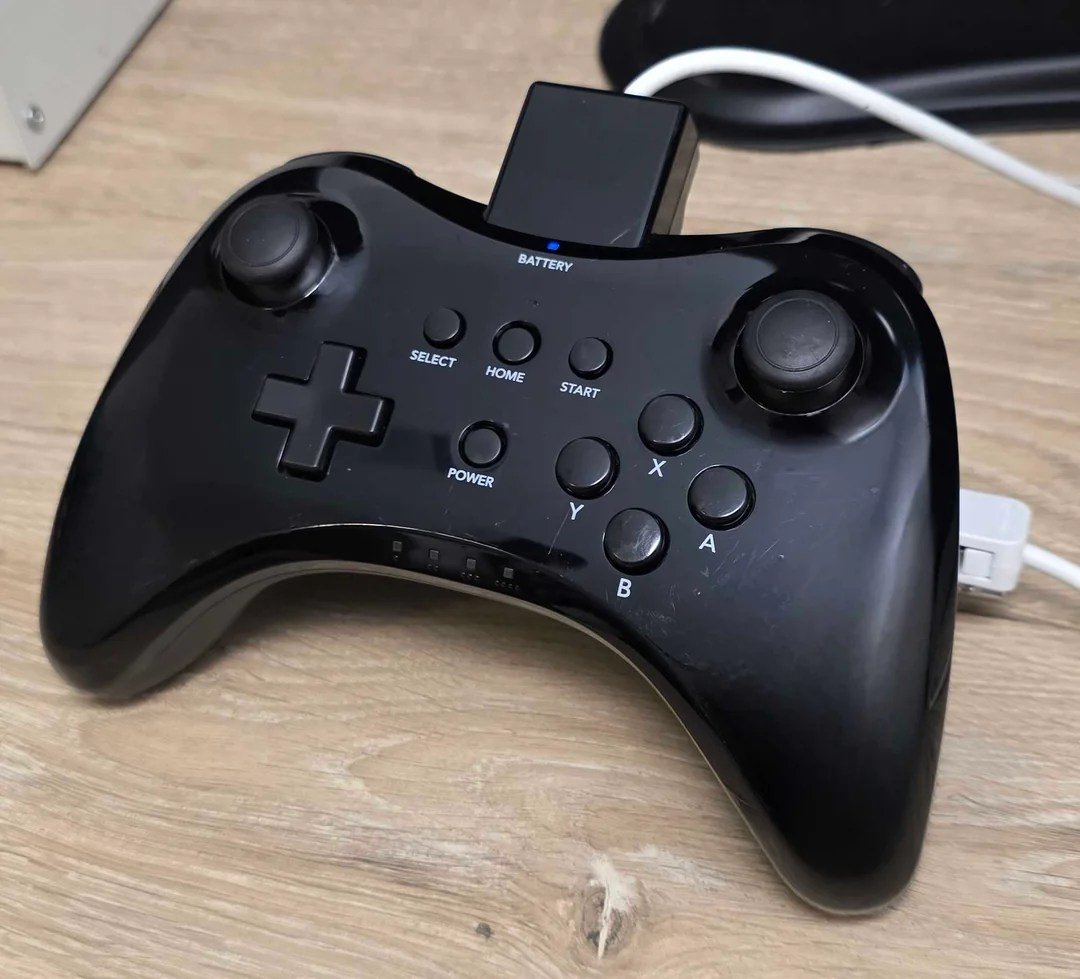
A rare Wii U development controller popping up online hits a special nerve, because it’s not just “cool old hardware” – it’s a small, physical clue from a period where the Wii U was still being shaped behind closed doors. In this case, the spark comes from a Reddit user showing off what they describe as a very rare Wii U dev kit Pro Controller, and the claim that it works perfectly, even when connected through a Wii Remote. That last detail is the part that makes people sit up straight, because “Wii Remote accessory” behavior points toward Classic Controller-style wiring and protocols, not the typical retail Wii U Pro Controller setup.
We also can’t ignore why the Toucan name keeps getting attached to it. Toucan is a term that shows up in Wii U technical and homebrew documentation, and it’s become a shorthand in some circles for early-era Wii U development context. When a controller looks like it belongs to that world, the community immediately starts connecting dots: early kits often used unusual accessories, adapters, and in-between solutions that never reached store shelves. That doesn’t automatically prove anything, but it explains why the conversation gets intense fast.
From there, the smart move is to stay grounded. We can talk about what’s being claimed, what would make the claim more believable, and what practical checks help separate a genuine prototype from a modern mash-up. We can also talk about why preservation matters here: the moment a rare device appears is the moment to document it carefully, before it disappears into a private collection forever. If you’re curious, cautious, or just a little nostalgic, this is exactly the kind of discovery that turns a quiet week into a community detective party.
The Wii U dev kit Pro Controller found through … Reddit
A Reddit user showing off an unusual Wii U controller is the kind of thing that can derail an entire community’s productivity in seconds, and that’s exactly what happened here. According to reporting that followed the thread, the user claims they have a very rare Wii U dev kit Pro Controller, they haven’t said how they obtained it, and they say it works perfectly. The attention-grabber is the extra claim that it works even when connected through a Wii Remote, which is a very specific detail that doesn’t get tossed around casually in Wii U controller talk. If you’ve spent any time with Nintendo accessories, you already know why: the Wii Remote’s accessory port is its own world, with its own expectations, and not every controller can just stroll in like it owns the place. The result is a classic mix of excitement and skepticism. We’re intrigued because the claim is oddly concrete, and we’re cautious because “rare dev hardware” is also the exact phrase that attracts misunderstandings, assumptions, and the occasional too-perfect fake.
Why this controller is being treated as development hardware
The reason people are treating this as development hardware is less about the word “dev kit” being used and more about the overall vibe of the device being described. In the Wii U era, there’s a clean line in most people’s heads: retail controllers are meant to be simple, wireless, and standardized, while development environments can be messy, practical, and full of odd add-ons. When someone claims a “Pro Controller” works through a Wii Remote connection, that immediately nudges the conversation toward Classic Controller-style behavior, because that’s the family of controllers designed to plug into the Wii Remote’s accessory connector. That doesn’t prove it’s real, but it does explain why the community’s mental model changes instantly. It stops being “someone found a weird color variant” and becomes “someone might have found an in-between tool from a transitional period.” And transitional tools are exactly the kind of thing that get used, abused, and rarely preserved, which is why they feel mythical when they resurface.
The design clues people are reacting to
Even without getting lost in rumor fog, we can say this: development accessories often look like they were built by someone who cares more about function than showroom polish. That can mean unusual protrusions, strange ports, labels, or attachments that don’t match retail norms. We’ve seen that pattern clearly with documented Wii U development hardware like CAT-DEV and CAT-R systems, where the goal is to build, debug, and test software in ways a normal retail console simply doesn’t allow. When a controller appears that seems to blend “Wii U-era shape” with “Wii Remote accessory behavior,” it sets off that same alarm bell. Think of it like finding a key that fits two different locks. Either it’s a clever custom job, or it was made for a special situation where compatibility mattered more than the usual product boundaries. That’s why the design discussion matters: not because we want to hype ourselves up, but because physical design is often the most honest witness in the room.
The wired add-on and why it changes the story
If the controller includes a wired add-on or adapter-style piece, that’s not a random aesthetic flourish – it’s a big functional clue. A wired module can change how power is delivered, how signals are routed, and how the controller identifies itself to the system it’s connected to. In development environments, wired connections are also common because they’re stable, predictable, and easier to debug when something goes wrong. Wireless is great when you’re playing on the couch. Wired is great when you’re trying to reproduce a bug for the tenth time and you’re one disconnect away from yelling at an innocent wall. If this device genuinely uses a Wii Remote as the “wireless bridge,” the wired portion may be doing the heavy lifting of translating signals into something the Wii Remote understands as an extension. That kind of translator hardware is boring in the best way, because it usually exists for a practical reason: make early prototypes work with the tools already on hand.
The Toucan-era Wii U development kits, in plain English
“Toucan” shows up in Wii U conversations like a nickname overheard at a reunion. Some people treat it as a key, others treat it as a shrug, and everyone agrees it points toward early development context. The important part is not the mystique, it’s the reality of early hardware cycles. Before a platform’s final industrial design is locked, teams still need to build games, test performance, try control ideas, and run demos without everything being pretty. That’s where odd peripherals thrive. A controller that looks like it belongs to the Wii U era but behaves like a Wii accessory fits that messy, transitional period perfectly. And if you’ve ever worked on anything technical, you know the truth: prototypes don’t exist to impress you, they exist to solve a problem quickly. If the problem was “we need traditional inputs working through a Wii Remote right now,” then a Toucan-era controller that does exactly that makes a lot of sense.
Where “Toucan” shows up in the Wii U conversation
When communities talk about early Wii U development, they tend to circle around a handful of recurring terms, and Toucan is one of them. It often gets mentioned alongside early kit discussions, prototype photos, and the broader “Cafe” era naming that pops up in tooling references. Even if we don’t have a neat, official public explainer from Nintendo that spells out every codename in bright neon letters, we can still treat Toucan as a practical label used by enthusiasts to talk about early-stage Wii U development context. That matters because it frames expectations. Early-stage environments are where you see adapters, hybrid devices, and controllers that feel like they’re borrowing parts from two different generations. In that light, the Toucan connection isn’t a magical stamp of authenticity. It’s a plausible setting where a strange controller design would be used without anyone blinking.
How early Wii U workflows shaped odd-looking gear
Early workflows tend to be built around speed and stability, not elegance. Teams want builds running, inputs recognized, and test cases repeatable. If a new controller standard isn’t finalized yet, you don’t halt development and stare at the calendar. You route around the problem. You reuse known components, like the Wii Remote’s extension ecosystem, because it already exists and already works. You build adapters so devs can test gameplay with familiar button layouts while the final controller design is still changing. And you accept that the resulting hardware can look a little Frankenstein, because the point is function, not shelf appeal. That’s why a “dev kit Pro Controller” that reportedly works through a Wii Remote is so attention-grabbing. It reads like a tool designed to bridge a gap, and bridging gaps is basically the unofficial job title of early development hardware.
Compatibility claims and what “works with a Wii Remote” means
The phrase “works with a Wii Remote” sounds simple until you zoom in. Does it mean the Wii Remote is physically connected and acting as the communication bridge, like it does with a Classic Controller? Does it mean a special adapter turns the controller into something the Wii Remote thinks is an extension? Or does it mean something looser, like “it also works in a setup where a Wii Remote is involved somewhere”? The difference matters. The Wii Remote’s extension port expects a certain kind of conversation, and extension devices typically identify themselves in recognizable ways. If the controller truly works as a Wii Remote extension, that suggests it is either speaking the expected language or it has hardware translating for it. Either way, it hints at intentional engineering, not a random coincidence. This is also where we should be practical. A claim like this becomes much stronger if we can see the connection method clearly and confirm it with photos or short video proof that shows the full setup from plug-in to inputs registering.
How Wii Remote accessories normally communicate
The Wii Remote’s accessory ecosystem is famous because it’s modular and surprisingly flexible. Plug in a Nunchuk or a Classic Controller, and the Wii Remote effectively becomes the wireless transmitter for that attached device. That setup is why the Wii can support so many accessory styles without every accessory needing its own wireless stack. Under the hood, the extension port uses a defined communication method, and accessories present data in a structured way. If you’ve ever wondered why third-party accessories can be hit or miss, it’s because “close enough” sometimes isn’t enough for stable input reading. So when someone says a dev kit controller works “even when connected to a Wii Remote,” it’s not just a party trick. It’s a claim that the controller is interacting with a mature accessory system that expects consistency. If true, it points toward a deliberate design decision: make early controller testing piggyback on the Wii Remote infrastructure that developers already had in their toolboxes.
Why that matters for a Wii U prototype controller
It matters because it changes what the controller might have been used for. If it’s built to behave like a Wii Remote extension, then it could have been intended for early input testing, compatibility experiments, or developer convenience during a period when Wii U hardware and software were still evolving. It could also hint at how early kits might have mixed Wii-era assumptions with Wii U-era goals. That kind of overlap is exactly what you’d expect when a platform is being built as both a successor and a bridge. Also, it gives us something concrete to evaluate. If the controller is truly an extension-style device, then photos of the connector, the cable, and the port layout become critical. The more we can see the physical interface, the less this becomes a “trust me” story and the more it becomes a piece of hardware we can understand with our own eyes.
How CAT-DEV and CAT-R fit into the Wii U development ecosystem
To understand why weird controllers exist, it helps to understand the environment they might have lived in. Wii U development hardware commonly gets discussed in terms of CAT-DEV and CAT-R. Think of these as purpose-built systems designed to help teams build and test games before the retail console is ready for prime time. Development setups often involve extra tooling, special firmware, and workflows that revolve around connecting to a PC, moving builds quickly, and capturing debugging information. Accessories in that world don’t have to match retail packaging expectations. They have to work, repeatably, in a lab or studio setting. That’s why a rare controller tied to development is believable in concept, even if we still need evidence for this specific device. A dev environment is exactly where you’d see odd adapters and prototypes, because the goal is to keep work moving while hardware design is still in motion.
CAT-DEV as the “build it” box and CAT-R as the “test it” box
A simple way to picture it is this: CAT-DEV is associated with active development workflows, while CAT-R is associated with later-stage testing workflows. That framing helps explain why different hardware variants exist at all. Development teams need systems that integrate smoothly with tools, while testers need systems that behave closer to retail but still accept special builds and verification processes. If you’ve ever had to test something before launch, you know the painful truth: the closer you get to release, the less you want surprises, and the more you want a controlled environment. Controllers and accessories used alongside these systems can be just as specialized. A prototype controller could exist to support early input experiments, or to provide a “traditional controller feel” while other elements are still being finalized. If that prototype also leans on Wii Remote extension behavior, it could reflect a practical choice: use the accessory pipeline that already exists while the Wii U controller lineup is still settling.
Why accessories for dev units can look unfamiliar
Retail accessories are designed for clarity. Dev accessories are designed for utility. That difference shows up in small things that collectors obsess over: unusual ports, simple labeling, odd color shells, or attachments that look like they belong in a drawer full of cables rather than a store shelf. Dev gear also tends to be produced in tiny numbers. That means fewer surviving examples, fewer photos, and fewer chances for the community to build a reliable reference library. So when something unfamiliar appears, it can feel like spotting an animal you thought was extinct. Exciting, yes, but also a moment where we need to slow down and verify details. Unfamiliar does not automatically mean authentic. It means we have homework to do, and the homework is mostly visual and technical: connectors, markings, internal boards if the owner is comfortable sharing, and evidence that the behavior matches what’s being claimed.
Why prototypes like this matter to preservation
It’s easy to look at a controller and think, “Neat collectible,” and move on. But prototypes and development peripherals matter because they capture decisions that were once on the table. They show what Nintendo and partner studios tried, what they abandoned, and what they carried forward. A retail product is the final answer. A prototype is the rough draft with coffee stains, crossed-out notes, and a few wild ideas scribbled in the margins. That’s why a rare Wii U dev kit controller is more than a trophy photo. It can help map the path between Wii-era accessory thinking and the Wii U’s final controller lineup. It can also clarify timelines and relationships between early kits and later hardware. Preservation isn’t only about keeping things in a box. It’s about documenting what exists while we still can, because the moment a rare device disappears into private storage, the community loses a chance to learn from it.
Hardware tells stories that software can’t
Software can be copied. Hardware carries scars. A controller’s plastic, ports, screws, and internal boards reveal what was prioritized, what was hurried, and what was considered “good enough for now.” Even tiny details can be meaningful, like how a connector is reinforced, how a cable is strain-relieved, or whether a label looks like a factory print or a quick internal tag. Those details can hint at whether something was meant for internal use, public demos, or developer testing. Hardware also reveals constraints. If a prototype relies on a Wii Remote, maybe it reflects a desire to reuse existing wireless behavior. If it includes an adapter, maybe it reflects a need to support a specific input mapping while other systems were in flux. These are the kinds of insights that don’t show up in a press release, and they’re exactly why preservation communities get so invested when rare devices surface.
What we should document the moment one appears
If a rare controller pops up, the best outcome is careful documentation that doesn’t put the owner at risk. High-resolution photos from multiple angles are the starting point: front, back, sides, ports, cables, and any markings. Clear shots of how it connects to a Wii Remote are especially valuable here, because that claim is central to why this controller stands out. Short videos showing inputs working can also help, because they reduce ambiguity. If the owner is comfortable and technically able, internal board photos can be a goldmine, since board layout and component choices can confirm whether the device was professionally manufactured or assembled from mixed parts. None of this requires revealing personal information or acquisition details. We can keep it focused on the object itself. The goal is simple: create a reference trail so future collectors and researchers can compare and verify, rather than relying on rumors and memory.
Spotting fakes and Franken-controllers
Whenever something rare shows up, fakes start lurking in the shadows like cartoon villains rubbing their hands together. That’s not paranoia, it’s pattern recognition. Retro hardware collecting has enough money and attention in it that counterfeiters and “parts mashers” have incentive to create convincing lookalikes. A Franken-controller can be especially tricky because it might use real Nintendo parts mixed with custom adapters, making it feel authentic at a glance. The goal here isn’t to accuse anyone. It’s to keep standards high so a genuinely rare device doesn’t get drowned out by imitations. The best approach is boring and methodical. Compare the physical characteristics to known references, look for consistent manufacturing details, and focus on what’s hard to fake, like internal boards and connector engineering. Hype is fun, but verification is how we avoid building a whole story on a clever arts-and-crafts project.
Visual tells we can actually verify
Some verification clues are surprisingly simple. Consistent screw types, clean plastic molding lines, and professional port cutouts usually point toward factory-level manufacturing rather than hobbyist modification. Labels and markings matter too, especially if they resemble internal model conventions used on other Nintendo hardware. Cable quality and connector fit are also revealing. A custom cable that looks too modern, too flimsy, or poorly strain-relieved can raise questions, while a cable that matches the sturdiness of Nintendo-era accessories can strengthen confidence. Another practical tell is symmetry and alignment. Factory products tend to be consistent, while hand-modified shells often show tiny misalignments around ports and seams. None of these tells are perfect on their own, but together they can paint a clearer picture. The more consistent and professionally finished the device looks, the more likely it is to be something that came from a real development pipeline rather than a weekend project.
Paper trails and cross-checks that help
Paper trails don’t have to mean receipts or personal details. In preservation circles, a “paper trail” can be as simple as cross-checking whether similar devices have been photographed before, whether documentation sites describe related development setups, and whether the device’s behavior matches known protocols. If a controller claims to be a Wii Remote extension, it should behave like one in consistent, repeatable ways. If it claims to be tied to early Wii U kits, we should be able to map it plausibly into known development hardware timelines. Cross-checks also include community expertise. There are people who collect dev hardware references the way some people collect stamps, and their input can help identify whether something looks right. The goal is not gatekeeping. It’s building a shared reality where rare devices can be discussed with clarity instead of pure speculation.
If you ever find one, how to handle it without wrecking it
If you ever end up near a rare dev controller, treat it like a museum piece that still wants to be played with, because that’s basically what it is. The biggest risks are boring ones: battery swelling, improper charging, corrosion, and physical stress on cables or ports. Start with gentle handling. Keep it away from moisture, extreme temperatures, and direct sunlight. If it uses an internal battery, don’t assume it’s safe to charge without checking for signs of damage. If it uses an external cable and connects through a Wii Remote, avoid yanking or bending the connector, because replacement parts may not exist. Also, resist the urge to over-test it. Repeated plugging and unplugging can wear ports, and rare ports are a nightmare to repair cleanly. Preservation doesn’t mean locking it away forever, but it does mean treating every interaction like it has a cost, because with rare hardware, it absolutely does.
Power, charging, and storage basics
Batteries are often the silent killer of old hardware. If the controller includes a rechargeable pack, check for swelling, unusual heat, or odd smells before charging. If anything seems off, it’s safer to stop and consult someone experienced with retro hardware restoration. For storage, aim for a stable, dry environment with moderate temperature. Use a soft cloth or archival-safe material to avoid scuffing the shell. If the device has a cable or adapter, store it so the cable isn’t under tension and the connector isn’t pressed against hard surfaces. A simple habit helps a lot: always disconnect by gripping the connector housing, not the cable itself. It sounds like a dad lecture, but it saves ports. And ports on prototypes can be irreplaceable. Treat the controller like it’s the last one you’ll ever see, because in many cases, that might be true.
Sharing responsibly while protecting the owner and the item
Sharing a rare find can be valuable, but it should be done with care. If you’re the owner, you don’t owe anyone acquisition details, personal info, or location hints. Keep the focus on the hardware itself. When sharing photos, consider avoiding backgrounds that reveal identifying details. When sharing videos, keep it simple: show the controller, the connection method, and the input working. If you’re not the owner, respect boundaries. The quickest way to make rare hardware disappear from public view is to turn curiosity into pressure. A good preservation moment feels collaborative, not intrusive. The best outcome is documentation that helps everyone understand what the device is, without putting the owner in a position where they regret showing it at all.
What we should watch for next
The next step in any rare hardware story is not louder excitement, it’s better evidence. If more photos appear, especially of the connection method and any markings, the story gains weight. If a short video shows it working as a Wii Remote extension in a clear, repeatable way, that’s even better. If documentation-minded people can compare it to other known prototypes, we can start separating what is unique from what is simply unfamiliar. It’s also worth watching for whether multiple examples appear. A single device can be a one-off prototype. Multiple similar devices can suggest a small production run for internal use. Either way, the “what’s next” phase is where things either become real history or fade back into rumor-land. The community can help by keeping the conversation grounded: curiosity, yes, but also patience and verification.
The follow-up evidence that would strengthen the story
We should look for evidence that answers practical questions. What exactly is the connector, and how does it interface with the Wii Remote? Does the setup require a specific model of Wii Remote, like Wii Remote Plus, or does it work broadly? Are there labels or markings that match known Nintendo internal conventions? Does the controller present itself like a Classic Controller family device when connected, or does it behave in a unique way? Even small details, like whether the cable length and build quality match Nintendo-era accessories, can help. If the owner shares internal board photos, those can be especially clarifying, since board design is hard to fake convincingly without serious effort. Strong evidence doesn’t require a dramatic reveal. It just requires clear documentation that makes the device understandable rather than mysterious.
The community angle that makes discoveries stick
The reason discoveries like this matter is because they pull people together into a shared detective effort. One person finds the object. Another person recognizes a connector style. Someone else compares it to known extension controller behavior. Another person links it to documented dev hardware timelines. That’s how a single Reddit post turns into preserved knowledge. The best part is that it doesn’t need to be combative. It can be playful, curious, and collaborative, like a group trying to identify a strange gadget found in a drawer. If we keep the tone respectful, the owner is more likely to share useful details. If we keep the approach technical, we’re more likely to reach a conclusion that holds up over time. And if we keep the documentation organized, the next time a similar controller surfaces, it won’t feel like starting from zero.
Conclusion
A rare Wii U dev kit Pro Controller showing up with claims of Wii Remote connectivity is exactly the kind of oddball discovery that makes Wii U history feel alive again. The excitement makes sense, because the details point toward a practical prototype designed to bridge eras, not just a quirky cosmetic variant. At the same time, the smartest way to treat this is with steady curiosity: look at the connectors, confirm the behavior, and document what’s visible. The Toucan connection is interesting because it fits the idea of early development workflows, where hybrid solutions are normal and polished retail design is not the goal. Whether this controller ends up being a confirmed dev accessory, a rare prototype, or something more complicated, the moment still matters. If we document carefully and share responsibly, we turn a fleeting sighting into something the community can learn from, reference later, and preserve for the long haul.
FAQs
- What makes a Wii U dev kit Pro Controller different from a retail Wii U Pro Controller?
- Dev or prototype controllers can include unusual ports, adapters, labels, or internal hardware choices that prioritize testing and compatibility over retail polish. The big difference is usually function and context, not just color or shell shape, and the strongest proof often comes from connectors, behavior, and internal board design.
- How can a controller “work with a Wii Remote” if it’s a Wii U-era device?
- If it truly works through the Wii Remote’s extension port, it likely behaves like an extension controller or uses an adapter that translates signals into the format the Wii Remote expects. That kind of bridging solution is believable in early development environments where teams reuse existing input pipelines to keep work moving.
- Does the Toucan name automatically confirm the controller is authentic?
- No. Toucan is often used as shorthand for early Wii U development context, but authenticity still comes down to evidence like physical build quality, connectors, markings, and proof of the claimed behavior. The name can make a story plausible, but it can’t replace verification.
- What’s the safest way to document a rare controller without damaging it?
- Start with high-resolution photos from all angles, plus clear shots of ports, cables, and any markings. If you test it, keep it minimal and gentle, avoid repeated plugging and unplugging, and never pull a connector by the cable. If battery health is uncertain, don’t charge it until you’ve checked for swelling or other warning signs.
- What are common red flags that a “rare dev controller” might be a fake or a parts mash-up?
- Red flags include sloppy port cutouts, inconsistent screws, modern-looking low-quality cables, misaligned seams, and claims that can’t be demonstrated clearly. A Franken-controller can still use real Nintendo parts, so the best checks combine external build quality with behavior verification and, if possible, internal board photos.
Sources
- Rare Wii U dev kit Pro Controller discovered, My Nintendo News, January 9, 2026
- Images show rare prototype of Nintendo’s Wii U Pro Controller, Nintendo Everything, January 9, 2026
- Wii U Architecture – A Practical Analysis, Rodrigo Copetti, (site page date shown on page)
- Wiimote/Extension Controllers, WiiBrew, (page date not consistently displayed)
- How to Set up and Use the Classic Controller and the Classic Controller Pro, Nintendo Support, (page date not consistently displayed)
- CAT-DEV, Rare Gaming Dump Wiki, November 29, 2025
- Wii U Developer Hardware, Luckless Heaven, (page date not consistently displayed)