














Summary:
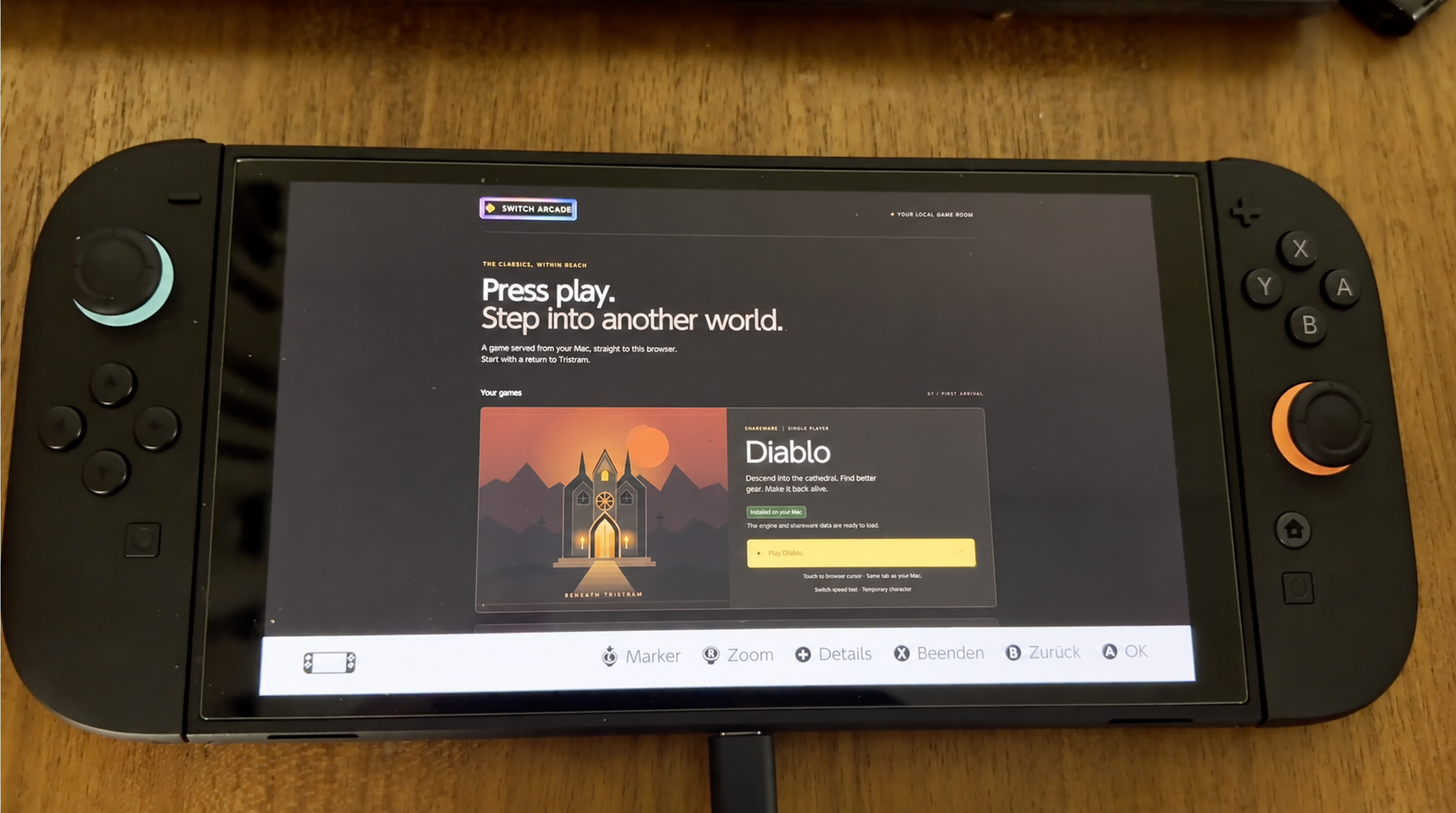
NintendoReporters learned thanks to buberlo that an experiment has shown classic Diablo running inside the Nintendo Switch 2’s hidden Wi-Fi login browser, using a local captive-portal served from a Mac and an open-source web port of the game. This setup does not install or modify anything on the console: the Switch simply opens its built-in captive-portal browser, the Mac answers Nintendo’s connection check via local DNS, and the browser loads a normal web page that hosts the Diablo shareware engine compiled to plain JavaScript. Performance is limited — roughly mid-teens FPS in menus and single-digit to low-teens FPS in town — and the setup needs a Mac on the same LAN running a DNS and web server. The project is open source, credits the Devilution community and d07RiV’s web ports, and is intended as an experimental toolkit to explore what the Switch 2’s embedded web applet can do when treated as a minimal game runtime.
Experiment overview: what was demonstrated on the Switch 2
This experiment showed that the Switch 2’s hidden captive-portal browser can render a full classic game in-browser when the console is pointed to a locally hosted page. The game in question is the Diablo shareware engine, compiled to JavaScript and adapted to run without WebAssembly or WebGL where necessary. Nothing on the console is changed or installed: the Switch’s connection test and login flow are repurposed so the browser opens a page hosted on a Mac on the same LAN. The Mac runs a simple DNS/web setup that answers Nintendo’s connectivity probes and hands off the login applet to a hosted game launcher. The result is a playable, local-lan-only demo with touch and on-screen button controls, basic save support on the Mac, and measured frame rates that demonstrate the concept while highlighting the browser’s limits.
Diablo running on a Nintendo Switch 2 – no hack, no mod, no homebrew. Just the console’s hidden Wi-Fi login browser, pointed at a page served from my Mac. 🧵 https://t.co/uhIwmilbHQ
— Konrad (@buberlo) October 11, 2026
Technical method: captive portal, DNS and a local web host
The core trick relies on captive-portal behavior: many Wi-Fi networks redirect your device’s first web request to a login page. In this case the Mac runs a small DNS and HTTP service that responds to the Switch’s connectivity test and serves a game launcher page instead of a generic portal. The Switch opens its built-in login applet and the applet displays a standard web page. The Diablo engine used is a web build derived from the Devilution reconstruction and web ports such as those by d07RiV, compiled to JavaScript so the hidden applet — which may lack WebGL, JIT, or modern features — can still execute the game logic in a Worker. Input is handled through touch and on-screen buttons, with optional gamepad support when the browser exposes a standard gamepad to the page. Saves are written back to the Mac host so nothing persists on the Switch itself. This local-only approach avoids any kind of public hosting or server-side game service.
Performance and controls: what to expect playing Diablo in the login applet
Performance is modest but functional: benchmarks from the experiment report about 16 FPS in menus and roughly 8 to 12 FPS in town areas. That reflects a carefully compiled JavaScript build running without WebAssembly and, in many cases, without a usable WebGL context in the applet. The engine runs inside a Worker when available to keep the UI responsive, and the page uses canvas fallbacks and a palette-based renderer to reduce CPU overhead. Controls are adapted for the small browser UI: tap-to-move/attack on the touchscreen, on-screen buttons for inventory, potions, and spells, and controller input where available. Save operations are proxied to the Mac host with confirmation messages; the experiment intentionally limits player data to local saves to avoid exposing any persistent cloud or multi-user storage. Long dungeon sessions and extended gameplay weren’t validated for stability, so expect glitches if you push the session length.
Setup requirements and practical limitations
This proof-of-concept needs a few very specific conditions to work. You must have a computer on the same LAN (the experiment uses macOS) that can run a DNS responder and a simple HTTP server, and you need to set the console’s DNS to point at that machine so the captive test resolves locally. The server tooling used by the experiment automates some of these steps, but binding low-numbered ports and running DNS services require admin rights and some networking knowledge. The browser applet is intentionally limited: no installation on the Switch, no firmware changes, and no online service is required. Because it’s local-only and depends on shareware game data, the experiment avoids redistributing the full commercial game files. The biggest practical limits are CPU-bound rendering without WebGL or WebAssembly and the need to keep the host machine awake and reachable for saves and assets.
Legal and ethical notes: what this experiment is and is not
It’s important to be clear about what this demonstrates and what it does not. The setup does not install software on the Switch, does not exploit firmware vulnerabilities, and does not provide a public service. The web port used is the shareware portion of Diablo and the engine is based on community reverse-engineering work such as Devilution and the diabloweb projects; the experiment’s repository is open-source (MIT) and fetches the free shareware data from d07RiV’s diabloweb project and verifies its hash; no game data is bundled. That said, distributing or using full commercial game data without permission is not endorsed. The experiment is intended as a technical exploration of the hidden browser’s capabilities and to offer tooling for others to test web games on the console in a private LAN setting, not as a route to piracy or persistent console modification.
Why this matters for Switch 2 owners and Nintendo fans
Whether you’re a nostalgic retro player, a home developer, or just curious about what the Switch 2 can display, this experiment is a useful reality check. It shows the hidden browser is capable of running nontrivial, CPU-heavy web builds when the runtime is tailored to its constraints. For players, it highlights that the Switch 2 still has a lightweight web path primarily meant for network logins and system features, which clever tooling can repurpose for small demos. For developers, it suggests a low-barrier testbed for browser-friendly games where a local host supplies assets and saves. If you follow Switch 2 coverage, keep an eye on related pieces on our Switch 2 hub for more discussion about what the console’s applets can and can’t do.
How the community can help and where credit belongs
The project explicitly credits the Devilution reconstruction contributors and the web ports by creators such as d07RiV, and the open-source repository used for the experiment is available for anyone who wants to study or contribute. If you want to help, performance-focused patches, renderer tweaks, or adjustments that reduce memory pressure in the Switch applet are the most valuable contributions. The repo also includes tooling to verify the shareware archive hash and to host saves locally, which keeps the setup focused on a private LAN. Community reports, pull requests, and compatibility notes are welcome — the goal stated by buberlo is to build a toolkit for more demanding web games in this constrained browser environment rather than to produce a polished public service.
Next steps and possibilities: where this could lead
There are no fixed plans yet, but the technically minded community might look into better JavaScript optimization, WASM fallbacks for supported sessions, or a refined canvas-based renderer that reduces CPU overhead. All ideas that have potential. But bulerbo notes no immediate plans for a wide optimisation push or support for a large library of commercial titles; this remains an experiment and an invitation for others to improve on the idea. Future work could explore multi-origin game libraries, richer save management under same-origin restrictions, or broader compatibility probes to check which web features the Switch 2 applet actually exposes. Any such work should stay local and respect legal boundaries for game data and distribution.
Conclusion
This experiment by buberlo is a clever demonstration of the Switch 2’s hidden captive-portal browser repurposed to host a web port of Diablo’s shareware engine from a local Mac. It proves the hidden applet can render playable experiences, but it also makes the limits clear: low fps, host-dependence, and strict LAN-only operation. For NintendoReporters readers interested in the technical side of consoles or who follow our 100% Nintendo perspective, it’s an interesting footnote — and a reminder that unexpected systems on consoles sometimes offer surprising possibilities when combined with open-source tooling and community effort.
FAQs
- Can I run this on my Switch 2 at home?
- Yes, but only with a host machine on your LAN that runs the DNS and web server tooling; it’s a private setup and does not install anything on the Switch.
- Does this require hacking or homebrew?
- No. The Switch opens its built-in login applet as designed; the experiment uses a locally served web page and does not modify system firmware or install homebrew on the console.
- Is the game data included?
- The repository and experiment use the Diablo shareware data by default; full commercial data is not redistributed and using it should follow the game’s licensing rules.
- How playable is this in practice?
- It’s playable for short sessions and demos but limited by frame rates (single to low double-digit FPS in towns). Dungeon sessions and long playtimes weren’t fully validated by the experimenter.
- Where can I learn more or contribute?
- Check the experiment’s public repository and related web ports; reports, PRs and performance patches are welcome from the community.
Sources
- switch2-web-games README, GitHub
- diabloweb, GitHub,
- Diablo Recompiled: Play Diablo in Your Browser, RecompiledGames, October 8, 2026
- Mastering Public Wi-Fi on Nintendo Switch 2: The Easy Captive Portal Fix, NintendoReporters, June 23, 2025