














Summary:
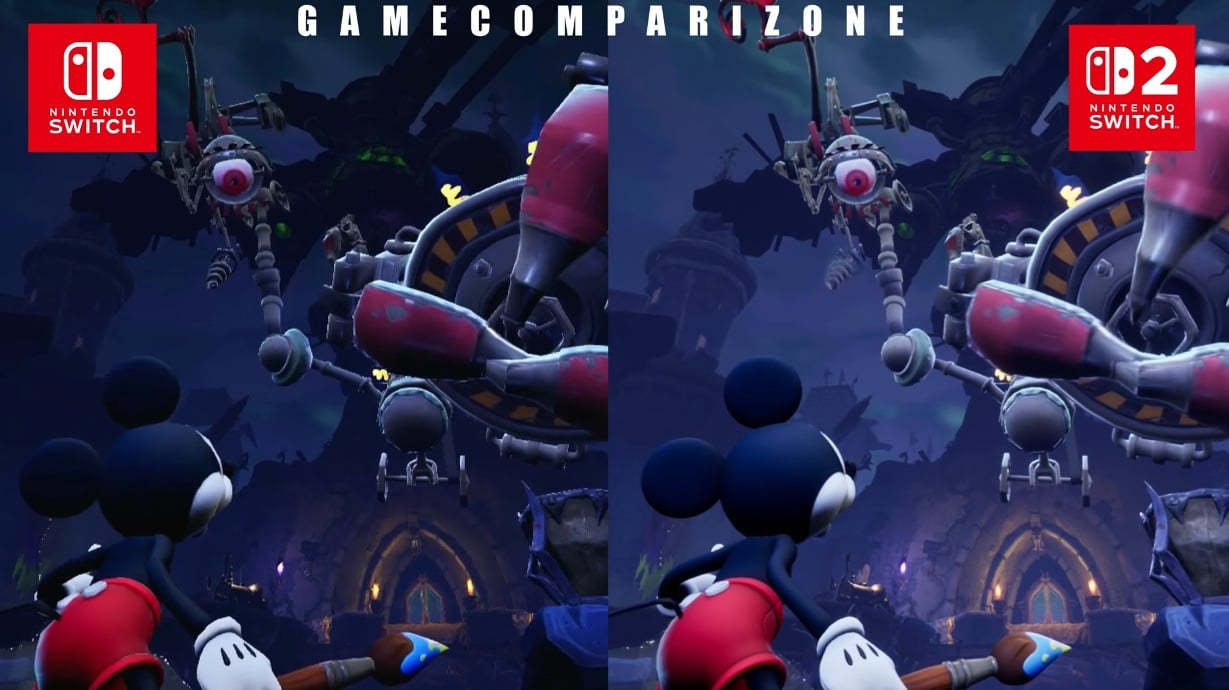
Recently a side-by-side video surfaced showing Disney Epic Mickey: Rebrushed running on Nintendo Switch 2 and the original Nintendo Switch. The comparison highlights clear performance gains on Switch 2 – a 60 frames-per-second target versus the Switch’s 30 FPS, much faster loading between areas, and some visible lighting and resolution differences. While the core art direction and assets remain faithful to the remake, the Switch 2 version smooths out motion, trims wait time, and brings subtle visual polish that benefits exploration and platforming. For players who already own the Switch release, a free upgrade path to the Switch 2 edition has been announced, making it easy to jump into the improved build without repurchasing. Whether you own a Switch 1 or a Switch 2, the comparison is worth watching before you decide where to play.
What the Epic Mickey: Rebrushed comparison video shows
The short video makes it easy to spot technical differences between the two versions without needing to be a tech expert. It strings together identical sections of Disney Epic Mickey: Rebrushed so you can line up camera angles, timing, and actions, and then play them back side-by-side. The Switch 2 build consistently aims for a higher frame-rate, which gives character animation and camera movement a smoother, more responsive feel. Loading screens that previously interrupted momentum are far shorter on Switch 2, which keeps exploration flowing and reduces the friction you feel when moving between areas. Lighting and resolution improvements are present but tasteful – the game still looks like the same artistic remake fans expected, only sharper and more stable. If you like watching direct comparisons, the video is a great, practical demonstration of how the same game benefits from the newer hardware.
Performance – framerate and load-time differences
The most obvious technical upgrade in the Switch 2 version is the framerate. Where the original Switch version targets 30 frames per second, the Switch 2 edition aims for 60 frames per second, and that change is immediately noticeable. A steadier 60 FPS results in crisper inputs and smoother platforming when you dash, jump, or aim Mickey’s brush. That alone can make tricky sequences feel less frustrating. Load times are another area with dramatic gains – the comparison includes an example where a load that takes roughly eleven seconds on the Switch completes in under three seconds on Switch 2. That drop changes how the game feels overall, turning former pauses into near-instant transitions that keep your momentum and attention intact. For players who value responsiveness and fewer interruptions, these two upgrades alone make a strong case for the Switch 2 build.
Graphics – resolution, lighting and visual fidelity
Graphically, both versions share the same remade art direction and asset set, so the game still reads as the same lovingly reworked Epic Mickey experience. The Switch 2 version, however, benefits from a higher output resolution and refined lighting that brings out more detail in textures and environments. Shadows and highlights appear cleaner, and some scenes show richer color depth and more consistent bloom, which helps the important visual cues stand out while you explore Wasteland. This isn’t a radical redesign – it is a refinement. That means fans of the original remake will recognize every section, but players on Switch 2 will enjoy a subtly crisper presentation that adds to immersion without changing the game’s tone. For collectors of visual fidelity, the upgrade feels like a worthwhile polish.
Controls and Switch 2-specific features
Beyond raw frame-rate and visuals, the Switch 2 version includes platform-specific refinements that improve comfort and control. The comparison and publisher notes mention support for mouse-style controls using the Joy-Con 2 controller and other tweaks to make targeting and camera adjustments feel more natural on the newer hardware. Standard button mapping remains familiar, but tighter performance at 60 FPS gives the whole control scheme a snappier sensation – you feel it when you dash, ground-pound, or line up precision jumps. While these changes won’t rewrite the way the game plays, combined with reduced loading and clearer visuals they present a more polished package that makes it easier to enjoy the game’s platforming and combat moments for longer stretches without fatigue.
Free Switch to Switch 2 upgrade – what it means for owners
Good news for people who already bought the Switch release: there is a free upgrade path to the Nintendo Switch 2 edition. That means you won’t be forced to buy the game twice to get the enhanced version – a free update or upgrade pack will let qualifying owners update their copy to take advantage of Switch 2 enhancements. This approach respects existing purchases and encourages players to try the upgraded experience without extra cost. If you own the physical or digital Switch edition, keep your game updated via the eShop or system update channels to receive the upgrade when it’s available. It’s a welcome trend that makes the transition between console generations friendlier for players who have supported the game from the start.
Why Switch 2 stands out for this remake
Switch 2’s hardware bump brings a combination of performance and convenience that suits a faithful remake like Epic Mickey: Rebrushed. The remade levels benefit from smoother motion and faster streaming, which in turn allows the studio to maintain the intended pacing while improving visual fidelity. For a game that balances exploration, platforming, and precise brush-based mechanics, those upgrades matter a lot. The Switch 2 version keeps the same level design and asset work but reduces technical compromises that were necessary on the original Switch. That lets players experience the remake closer to how the developers visualized it on higher-end platforms. If you’re curious about console-generation differences, the Switch 2 build gives a clear example of how the same codebase reacts to stronger hardware.
Practical considerations – file size, saves and DLC
When jumping between versions, practical details matter. The Switch 2 edition includes the Costume Pack DLC, so players on the newer console get the extra outfits without needing separate purchases when the upgrade path is part of the package. Save data handling and transfer options depend on how Nintendo and the publisher set things up for each release, so check your system’s software information and the official upgrade instructions if you plan to move between consoles. In many cases the original Switch version remains playable on older hardware while the Switch 2-specific enhancements are accessible only on the new system, so owning the base game still retains value. For those concerned about storage and progression, confirming the upgrade flow and whether save transfers are supported before switching systems is a smart move.
Who should play on Switch and who should seek Switch 2
Deciding where to play comes down to priorities. If you only have an original Nintendo Switch and you enjoy the remake’s core design, the game is still fully playable and preserves the remake’s improvements to mechanics and level design. However, if you own a Nintendo Switch 2 or plan to upgrade soon, the Switch 2 version is the better choice for smoother frame-rates, faster load times, and a cleaner presentation. Players who care about responsiveness – speedrunners, completionists, and precision platformers – will appreciate the jump to 60 FPS. Casual players who prioritize convenience or who only have a Switch 1 will still find a solid experience. Remember that if you already bought the Switch version, the free upgrade path lets you try the Switch 2 edition without repurchasing, which removes much of the financial pressure from the decision. For full details about the console and upgrade options, check the dedicated Nintendo Switch 2 page here.
Conclusion
In short, the comparison makes it clear that Epic Mickey: Rebrushed benefits noticeably from the Switch 2’s improved performance. The remake keeps its artful identity while gaining smoother animation, faster transitions between areas, and modest but worthwhile visual upgrades. For owners of the Switch release, the free upgrade path means there is little downside to trying the new edition if you can access it. Whether you stick with Switch or move to Switch 2, the remake brings Mickey back to Wasteland in a way that should please both long-time fans and players discovering the series for the first time. If you care about framerate and shorter waits, Switch 2 delivers a more fluid play session that enhances exploration and platforming moments.
FAQs
- Does the Switch 2 version run at 60 FPS?
- Yes – the Switch 2 edition targets 60 frames per second, while the original Switch version targets 30 FPS, giving a smoother experience on Switch 2.
- Are load times shorter on Switch 2?
- Yes – the comparison video shows load times dropping from roughly eleven seconds on Switch to under three seconds on Switch 2 in the same section, improving pacing and flow.
- Do the graphics look different between versions?
- The art direction and assets remain the same, but Switch 2 offers higher resolution and subtle lighting improvements that make scenes appear sharper and more detailed.
- Will my Switch version upgrade to Switch 2 for free?
- Yes – the publisher announced a free upgrade path for existing Switch owners to move to the Nintendo Switch 2 edition when available.
- Is the Costume Pack included on Switch 2?
- The Switch 2 edition includes the Costume Pack DLC, so players on the new system get the extra outfits as part of the release.
Sources
- Video: Epic Mickey: Rebrushed Nintendo Switch 2 vs. Switch 1 graphics comparison, NintendoEverything, October 9, 2026
- Unleash the Power of the Brush in Disney Epic Mickey: Rebrushed – Available NOW for Nintendo Switch 2, THQ Nordic, October 6, 2026
- Epic Mickey: Rebrushed – A Fresh Coat Of Paint For A Once-Flawed Platformer, NintendoLife, August 22, 2024
- Disney Epic Mickey: Rebrushed – Costume Pack, Nintendo, September 24, 2024