














Summary:
Onimusha: Way of the Sword has arrived with a clear set of technical trade-offs that mostly favor stable gameplay on Nintendo Switch 2. Digital Foundry’s recent analysis and a separate Switch 2 vs PS5 comparison show this version delivers a faithful Onimusha experience with sensible compromises: an optional 30 FPS cap for rock-solid pacing, an unlockable higher frame option for players who prefer smoother motion, and image-quality adjustments that keep performance in check. Docked output targets full HD but can dip in demanding scenes, while handheld caps near 900p. DLSS-style upscaling appears to be in use to help the Switch 2 hit those targets. This write-up breaks down what those findings mean for you – from the visible differences compared to PS5 to which mode to pick based on play style – and points to the original analysis and official announcements so you can check the details yourself.
Digital Foundry’s findings for Onimusha: Way of the Sword Switch 2 players
Digital Foundry’s video and analysis give us a practical snapshot of how Capcom tuned Onimusha for Nintendo Switch 2. The headline: Capcom aimed for a stable, playable experience rather than chasing platform parity with high-end consoles. That means you get an optional 30 frames-per-second cap with excellent frame pacing and a smooth, consistent feel during intense encounters. If you prefer higher frame rates, an uncapped or variable mode is also present, but it will fluctuate depending on scene complexity. To hit performance targets the team dialed back certain visual elements – hair detail and some texture sharpness among them – and leaned on upscaling tech to maintain a respectable resolution in docked and handheld modes. The result is a version that keeps the core combat and spectacle intact while accepting sensible visual concessions. For many Switch 2 owners, this will feel like the best balance between visuals and playability you can reasonably expect from a demanding RE Engine game on handheld-first hardware.

Frame rate modes and stability
Frame rate is the practical heart of the experience, and here Capcom gave Switch 2 owners options. The 30 FPS cap is the comfortable choice: it locks the game to a predictable cadence, removes stutter and micro-hitches, and slightly improves visual clarity because the engine can budget more GPU time to effects and draw distance. For players who crave responsiveness, unlocking the cap allows the frame rate to rise toward 60 FPS in lighter scenes but it will dip back toward 30 during complex boss fights or heavy particle moments. That variable behavior makes the unlocked mode feel livelier at times but also less consistent. Digital Foundry praised the capped mode for perfect frame pacing and stability, which matters in a title where timing and parrying can be decisive. If you value predictability for aiming parries and reading enemy tells, stick to the 30 FPS mode; if you want the occasional silky smooth moment and accept flux, try uncapped and see how it plays on your setup.
Resolution and visual compromises
Resolution is where the Switch 2 port shows its trade-offs. Docked mode targets 1080p at its best, but Digital Foundry notes resolution can dip below that when scenes get heavy. Handheld tops out near 900p, which still looks quite tidy on the console’s screen but is naturally softer than the PS5 or high-end PC versions. To preserve performance, the port reduces hair quality, softens some textures, and applies less aggressive lighting detail in places where the PS5 can afford to be richer. Those changes are noticeable if you put the versions side by side, but they rarely alter the feel of the game. Capcom prioritized readable combat animations and stable pacing – sensible choices for a swordsman-focused release where clarity and timing are more important than crystal-sharp distance detail. Upscaling fills in a lot of the gaps, but keen-eyed players will spot the compromises in contrast, shadow definition, and fine texture fidelity.
Docked vs handheld specifics
Knowing how the game behaves in docked and handheld modes helps you pick where to play. Docked mode aims for 1080p and emphasizes a steadier image on a TV, but in demanding set pieces the resolution can dip and motion may be slightly less crisp than the PS5. Handheld is capped around 900p and benefits from the smaller screen – that lower resolution reads better and the portable experience feels cohesive. The handheld mode also tends to benefit more from the 30 FPS cap, since the stability gains are more obvious on the smaller display and battery life considerations are more relevant. If you mostly play on the go you may find handheld the most appealing compromise: the visuals are still strong, the framerate choices remain, and the game keeps its pacing. If you prefer the biggest picture and sharper overall detail, docked on a good TV will be the better fit, but expect occasional resolution dips as scenes ramp up.
DLSS-style upscaling and performance tricks
Digital Foundry and other technical observers point to an upscaling solution at work on Switch 2 that behaves like DLSS on higher-end platforms – improving effective resolution while easing GPU load. That sort of trick helps the Switch 2 hold usable resolution numbers without having to render every frame at native full HD. It also makes the decision to lower hair and texture detail easier, because upscaling can hide some of those reductions from casual view. Beyond upscalers, Capcom appears to balance shadow draws, LODs and post-process quality depending on whether the game is capped or uncapped, leaning on the 30 FPS mode to squeeze out extra clarity. The takeaway is simple: sophisticated upscaling plus selective quality reduction gives Switch 2 owners a game that looks good for the platform and runs with the responsiveness that action combat demands.
Switch 2 versus PS5 – what changes visually
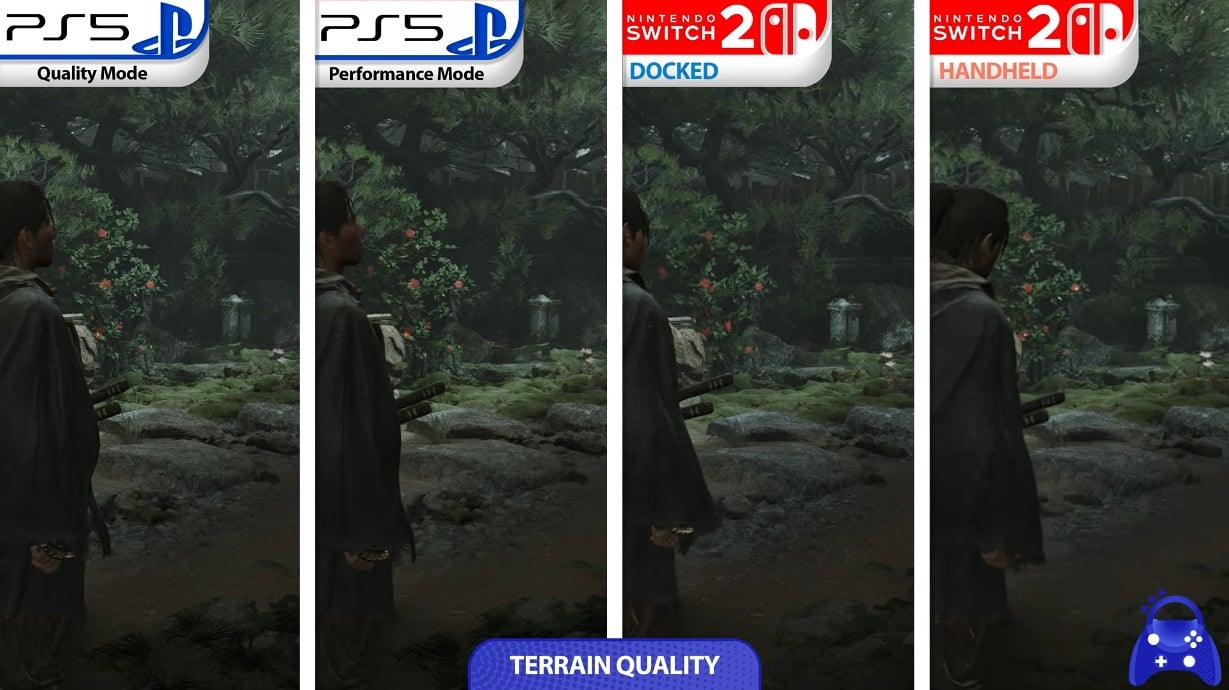
Set side by side, the PS5 version pulls ahead in detail, contrast and texture sharpness – as you would expect from a more powerful console. The Switch 2 version keeps the composition and core artistry intact, but sacrifices micro-details and some dynamic lighting finesse. Hair strands, tiny specular highlights, and the crispest texture edges are easier to spot on PS5, and ray-traced touches available on high-end models simply aren’t present on Switch 2. That said, Capcom did a convincing job of preserving the game’s atmosphere: environments still read correctly, boss encounters keep their visual punch, and the animations that sell hits and parries remain at the center of the experience. If you want absolute visual fidelity and optional ray-traced bells, PS5 is the ticket; if you want portability and a faithful Onimusha experience on Nintendo hardware, Switch 2 does the job with clever engineering choices. It’s a pragmatic compromise rather than a failure – the game delivers its story, combat and cinematic moments across both platforms in ways that match how most players will actually experience it.
Notable differences – hair, textures and sharpness
Three visual items stand out when comparing platforms: hair fidelity, texture sharpness and image contrast. Onimusha tends to use hair and cloth details as part of its visual storytelling, and these are the first things trimmed on Switch 2. Textures at distance and on smaller props receive less density, which reduces the crispness of background detail. Image contrast and shadow resolution are also eased on the Switch 2 build, so some scenes appear flatter compared to PS5. These reductions are most obvious when you put both versions on-screen at the same time. But taken on their own, they are not game-breakers. Combat clarity, enemy telegraphs and the fluidity of animations are preserved, which matters far more for gameplay than a handful of extra texture pixels. For most players the Switch 2 trade-offs are subtle and acceptable, especially given the option to choose a capped mode for reliability.
How lighting and contrast shift across platforms
Lighting defines atmosphere, and on higher-end hardware the game gets richer contrast, higher-quality shadow maps and more detailed ambient occlusion. On Switch 2, those systems are tuned back: shadows are softer, some ambient occlusion layers are thinned, and global illumination is simplified. That results in a picture that can look a touch washier compared to PS5, particularly in scenes that rely on complex light interplay. However, Capcom ensures key gameplay-readability cues remain intact – enemy outlines, hit flashes and visual effects tied to the Oni powers are preserved so combat never becomes confusing. The change is more about subtle cinematic polish than clarity or accessibility; you lose a little of the visual drama but keep the things that help you play better. For players who prize atmosphere above all, PS5 will feel more cinematic; for those chasing portability and steady play, Switch 2 remains compelling.
Practical advice for Switch 2 players
If you own a Switch 2 you get choices, and those choices should reflect how you play. Prefer consistent input timing and want to make every parry count – choose the 30 FPS capped mode. Want the occasional high-frame smoothness and are willing to accept variability – try the uncapped mode and keep an eye on demanding scenes. If you play handheld often, the capped mode delivers the best balance for battery and stability. For docked sessions on a big TV, experiment with uncapped mode if you have a TV capable of higher refresh rates, but remember the image will soften under load. Also consider whether you value portability more than pure visuals: switching between handheld and docked will give you different experiences, and both are legitimate ways to enjoy Onimusha. Finally, keep system software and the game updated – patches can and often do improve performance post-launch, especially on modern platforms where day-one fixes are common.
Which mode should you pick and when
Short answer – it depends on what matters to you. Competitive-minded players who respect timing should lock to 30 FPS and enjoy the smoother pacing and tiny visual gains it brings. Players who love cinematic motion and have a setup that favors higher refresh rates can try the unlocked mode, but be ready for dropping framerates during boss fights and dense moments. Handheld players usually benefit most from a stable 30 FPS lock because it improves perceived smoothness on a smaller screen and helps battery life. Docked players can experiment more, especially if they prioritize motion over static detail. The good news is the game gives you the option to test both styles, so take a few fights in each mode and pick what feels best for your reflexes and TV or screen.
Conclusion
The Switch 2 version of Onimusha: Way of the Sword is a pragmatic, well-tuned release: it trades a handful of visual niceties for stable performance and keeps everything that makes the game feel like Onimusha. Whether you pick the 30 FPS locked mode for rock-solid pacing or unlock the framerate for occasional high-FPS moments, the game stays fun and readable. If you want absolute graphical fidelity you have better options on PS5, but if portability and a solid swordsman experience on Nintendo hardware are priorities, the Switch 2 port delivers. Keep an eye on patch notes and community reports – ports often improve quickly after launch – and try both modes to find the one that fits your play style.
FAQs
- Will the Switch 2 version run at 60 FPS?
- The Switch 2 build can run above 30 FPS when the cap is unlocked, but the game commonly fluctuates between 30 and higher values depending on scene complexity, so sustained 60 FPS is not guaranteed.
- Does Switch 2 use DLSS?
- Digital Foundry and other observers suggest an upscaling solution similar to DLSS is being used to help maintain resolution targets, though it is an implementation tuned for Switch 2 hardware rather than the PC/console DLSS implementation.
- Which mode should handheld players choose?
- Handheld players will generally get the best balance from the 30 FPS cap – it stabilizes pacing, helps battery life and reads well on a smaller screen.
- How different does the PS5 version look?
- PS5 shows clearer textures, richer contrast and extra lighting detail, but the core animations, combat readability and boss spectacle are preserved on Switch 2.
- Will future patches improve Switch 2 performance?
- It’s common for developers to tweak performance post-launch; keep an eye on official patch notes and Digital Foundry follow-ups for any improvements or new modes.
Sources
- Onimusha: Way of the Sword tech analysis including frame rate and resolution, Nintendo Switch 2 vs. PS5 graphics comparison video, NintendoEverything, September 3, 2026
- Video: Digital Foundry Delivers Its Tech Review For Onimusha: Way Of The Sword, Nintendo Life, September 3, 2026
- Onimusha: Way of the Sword Release Date Moved Up to September 4!, CAPCOM press release, July 2, 2026