














Summary:
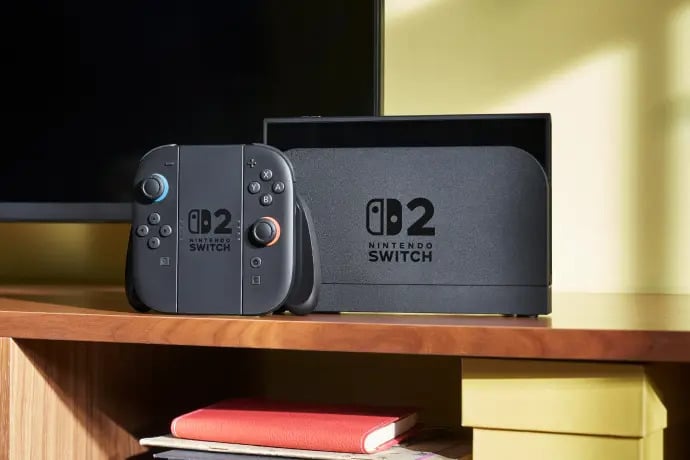
Version 23.0.0 for Nintendo Switch 2 is now rolling out, bringing a practical mix of quality-of-life adjustments and platform-level features that change how you play, chat, and move between consoles. The headline is TV-mode VRR output, but that’s just one piece of a wider patch that touches GameChat usability, virtual game card handling, Mii editor audio, accessibility language support and a new full-transfer flow between two Switch 2 consoles. You’ll also find adjustments to handheld performance toggles, TV sound memory per display and a new way to temporarily play software with an online license if a virtual game card can’t be moved. Read on to see what matters for players, how to update safely, and quick tips to get the most from this release.
What System Update Version 23.0.0 Changes and Why It Matters for Switch 2 Owners
Version 23.0.0 is more than a maintenance push – it’s a user-focused update that tightens the Switch 2 experience across several everyday touchpoints. The update improves social features like GameChat so chats you joined appear in joinable lists and lets you start a chat without picking friends first. It adds VRR output in TV mode, which can smooth gameplay on compatible TVs when both the dock and the game support it. There’s also a full transfer option to move save data, screenshots and more to a new Switch 2, and a helpful online license fallback for virtual game cards when transfers fail. These changes are aimed at reducing friction – fewer hoops to jump through when swapping consoles, clearer chat controls, and better TV output options. For anyone invested in the Switch 2 ecosystem, this one nudges usability forward in meaningful ways.
GameChat Improvements and New Chat Usability Options
GameChat gets targeted, practical tweaks in 23.0.0 that make group voice and text interactions easier to manage. Chats you previously joined now show up in the list of joinable chats so you don’t have to hunt for an invite or recreate a session. There is also an option to start a new chat and join it without selecting friends up front, which speeds things up when you want to open a quick lobby or test voice settings. A small but neat UI convenience is a new “screen size” button appearing in the C-button menu during chats, letting you adjust on-screen layout while you’re talking. All of this helps lower the friction for multiplayer sessions, making it simpler to jump into voice calls and coordinate play without interrupting the action.
TV Mode VRR Support – What It Means and Dock Update Requirements
Virtual Refresh Rate – VRR – is the headline feature many players will notice in version 23.0.0, but it comes with a few real-world caveats to understand. When both the game and your TV support VRR, the Switch 2 can output at a refresh rate that matches the game’s rendering, which reduces screen tearing and can make uncapped frame rates look smoother. To use this you’ll likely need a firmware update for your Switch 2 dock too, because the dock handles the TV output. Developers must also enable VRR support inside their games, so not every title will instantly benefit. In practice this means early adopters may see VRR in Nintendo’s own test titles first, with third-party support arriving over time. Still, the change unlocks a clearer path for TV-side performance improvements and future feature parity with other modern consoles.
Virtual Game Cards, Online License Fallback, and How Launch Behavior Changes
One of the more useful but easy-to-miss additions is how virtual game cards are handled when moving between systems. If a virtual game card can’t be moved from another console at launch – for example because that other console is offline – a “Play with Online License” option will appear so the purchaser can temporarily play the game without waiting for a transfer. This is strictly limited to the account that bought the game, and it’s meant as a fallback so you aren’t blocked from playing if the transfer hits a snag. The update also adds a Settings entry to the Virtual Game Cards list so you can check registration status of consoles linked to each card. Together, these changes reduce frustration around digital ownership and transfers by giving clearer options when the ideal path fails.
Full Transfer Between Switch 2 Consoles – What Moves and What to Expect
Version 23.0.0 introduces a “Full Transfer” flow to move almost everything from one Switch 2 to another – saves, screenshots, user accounts and more. This is the all-in-one migration many of us wanted after the initial release window, because it lets you treat a new device like a true replacement without manually re-downloading or rebuilding your library. The transfer can also be configured to skip automatic re-downloads of software and to avoid moving album data if you prefer. Play time totals are now combined when the same software is used across multiple systems, appearing in sequence and starting with gameplay after the update. The transfer is intended to be straightforward, but you should still follow official steps and back up microSD content if you use custom storage methods. Overall, this addition makes hardware upgrades far less painful.
Accessibility Additions – Portuguese Voice Reading and GameChat Text-to-Speech
Accessibility options received meaningful attention in this release, expanding voice reading and text-to-speech functionality. Portuguese (Brazil) has been added to the Voice Reading option in System Settings and to GameChat voice-to-text and text-to-speech conversions. These additions make the system more usable for a wider group of players and show Nintendo continuing to invest in multilingual accessibility. The update also improves audio handling and allows TV sound settings to be stored per connected TV, which is helpful for players who switch between displays. Combined, the accessibility and audio tweaks make the experience more consistent across setups and friend groups, and they give Portuguese-speaking players more native support in system-level features.
Handheld Mode Boost, Controller Behavior, Mii Editor Music, and Play Activity Tracking
Several smaller but player-facing changes landed that change how the console behaves in everyday use. A quick-toggle for Handheld Mode Boost was added to Quick Settings so you can change performance modes faster by holding the HOME button. You can also use other controllers even while Joy-Con 2 are attached, which helps multiplayer flexibility. The Mii editor now plays background music while you edit, and a BGM Settings button lets you switch or stop it. Play activity now combines time when the same game is used on multiple consoles, making total playtime more accurate in your profile. These adjustments are about convenience – faster toggles, friendlier controller options and little touches that make the system feel more polished.
Practical Tips – How to Update, What to Back Up, and Update Cautions
Updating to 23.0.0 is straightforward if your Switch 2 is online – open System Settings and check the update pane – but there are a few smart precautions. Only update the console in its normal state and avoid using modified firmware or unsupported accessories during the process, because modified systems can fail after an official update and are not covered by warranty or repair. If you plan to perform a full transfer to a new Switch 2, back up any microSD data and ensure both consoles are charged and connected to stable networks. If your dock or controllers also have pending firmware updates, install those after the system update to enable features like TV VRR. Finally, check the Virtual Game Card registration status if you rely on digital ownership – the online license fallback helps, but it’s best to keep transfers orderly.
Conclusion
Version 23.0.0 is a practical, player-first update that improves several everyday areas of the Switch 2 experience – from chat and accessibility to TV output and transfers between consoles. There are no sweeping new apps here, but the combined changes reduce friction and unlock useful features like VRR for compatible TVs, online license fallbacks for virtual game cards and a full-transfer option for moving to a new Switch 2. If you own a Switch 2, apply the update on a stable connection and check for dock and accessory updates so you can take advantage of everything available. These thoughtful tweaks add up to a smoother, more flexible system experience for players and communities across the platform.
FAQs
- How do I enable VRR on my Switch 2 and TV?
- To use VRR you need version 23.0.0 on your Switch 2 and a dock firmware update. Your TV must also support VRR and the game needs to enable it. Check System Settings and update your dock when prompted, then verify the game supports VRR.
- What does “Play with Online License” mean for virtual game cards?
- If a virtual game card can’t be moved because the other console is offline, the purchaser can temporarily launch the software using an online license. This option is restricted to the account that bought the software.
- Will play time merge if I play the same game on two consoles?
- Yes. After the update, play time for the same software on multiple consoles is combined and totals appear sequentially, starting with play done after the update.
- Can I transfer everything to a new Switch 2 with Full Transfer?
- The Full Transfer option moves save data, screenshots and many account items. You can choose options to skip software re-downloads or album transfers if you prefer. Back up microSD data if you use custom storage.
- Is it safe to update if my console is modded or uses unsupported accessories?
- No. Updating a modified console or one using unsupported accessories can render it inoperable and such consoles are not covered by warranty. Update only when the console is in its normal state.
Sources
- Nintendo Switch 2 System Update 23.0.0 Is Now Live, Here Are The Full Patch Notes, Nintendo Life, September 10, 2026
- Nintendo Switch 2 Update Version 23.0.0 Adds VRR In TV Mode And A Bunch Of Other Features, Press Start, September 10, 2026
- Nintendo Switch 2 System Update – Nintendo Korea Support, Nintendo Support Korea, September 10, 2026