














Summary:
Nintendo has quietly expanded its My Mario lineup with two new free apps, Hello, Luigi! and Hello, Peach!, now available on the Nintendo eShop. These toddler-friendly apps put a playful, touch-driven portrait of a familiar character on your Switch or Switch 2 screen so kids can poke, stretch, and interact with faces while parents keep control with built-in break settings and offline play. They mirror the mechanics of earlier Hello titles while adding compatibility with the My Mario wood-block amiibo line in some updates, making them useful for short, supervised play sessions. NintendoReporters recommends them for families looking for safe, simple, and character-led screen time that encourages interaction rather than passive watching, and they serve as a cute complement to larger Mario releases.
What Hello, Luigi! and Hello, Peach! actually are
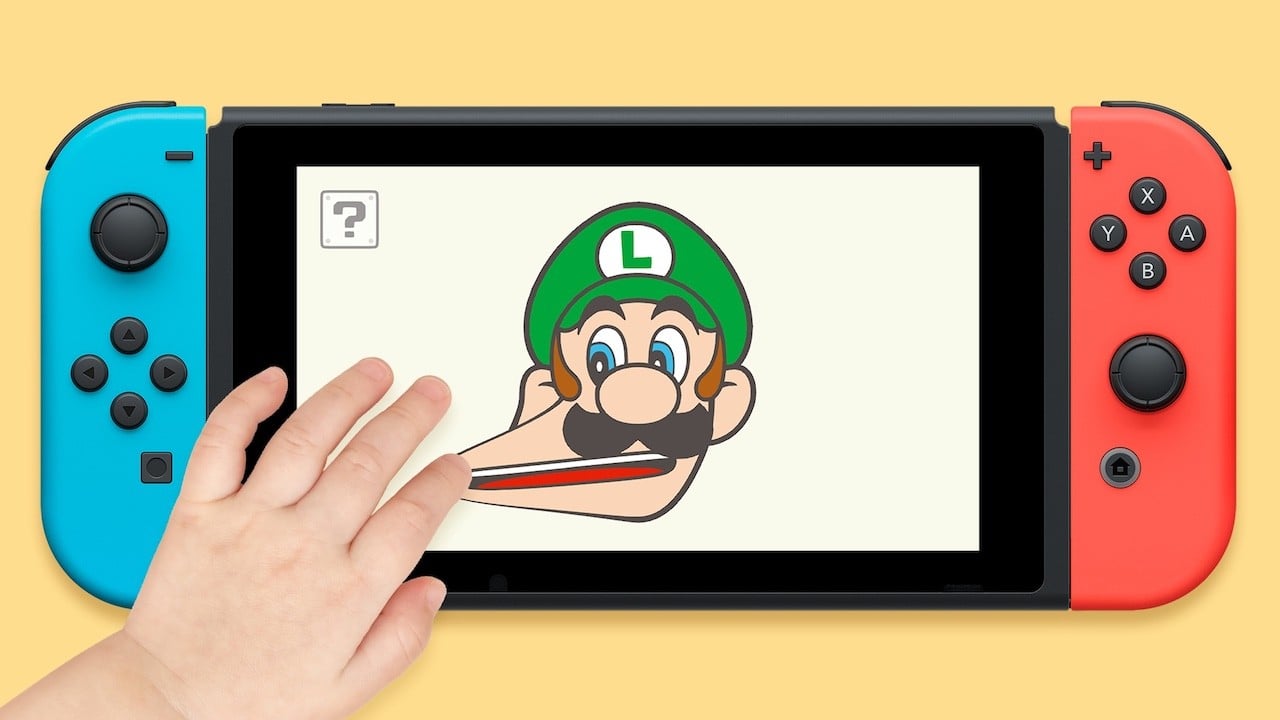
Hello, Luigi! and Hello, Peach! are simple, free applications from Nintendo designed for very young players and families. They display a large, touch-reactive portrait of Luigi or Peach on the Nintendo Switch touchscreen so little hands can poke, drag, and stretch expressions while the characters respond with funny faces, sounds, and animations. Think of them as interactive picture books with a single interactive page: tactile and forgiving, perfect for toddlers who love repetition and immediate feedback. The visuals lean into bright, friendly art and exaggerated expressions that are easy for children to understand, and the whole idea is to offer short, delightful interactions that are safe and easy to cleanly exit when playtime is over.
How the apps play on a practical level
Interaction is intentionally simple and physical: you tap, pull, and swipe the character’s face to make silly expressions, or use the on-screen menu to add items like mushrooms, stars, pipes, or even a Boo guest appearance. Both Hello, Luigi! and Hello, Peach! mirror the same touch-first mechanics used by the earlier Hello apps, so parents who have used Hello, Mario! or Hello, Yoshi! will feel right at home. Controls are forgiving and predictable, with visual and audio feedback to reward every gesture so children learn cause and effect fast. The games are designed to be intuitive without menus or complex settings in the middle of play, so even non-readers can enjoy them with minimal guidance.
Screen-time controls and the built-in break feature
One of the clearest family-focused design choices is the automatic sleep feature: after a period of play the character will fall asleep and ignore further pokes until the app is restarted, nudging kids toward a break. That feature exists to help parents avoid prolonged unattended screen time, and it can be toggled off in settings for times when a longer session is acceptable. There are no elaborate digital-parenting dashboards, but the simple built-in break is a smart compromise that nudges healthy habits without being intrusive. For parents who need to hand a device to a toddler at a store or while traveling, that auto-sleep adds reassurance: play is fun, but it has a natural stop button that respects routines and limits.
Availability, platforms, and where to download
Both Hello, Luigi! and Hello, Peach! are available now as free downloads on the Nintendo eShop for Nintendo Switch and Switch 2. If you want to see similar offerings or browse other family-friendly Nintendo releases, check the Nintendo Switch section on NintendoReporters for context and related news. Availability on mobile storefronts varies by title: the earlier Hello apps appeared on iOS and Android, but these two were initially listed on the eShop, so double-check your regional storefront. The Switch versions are optimized for touch interaction on the console’s built-in display, which makes them especially suited to handheld use or supervised play while docked with the screen accessible to little hands.
Offline play, amiibo interaction, and practical eShop notes
After download, both apps support offline play so you don’t need a persistent connection to run them – a useful feature when traveling or in places with limited Wi-Fi. Nintendo Life and other outlets have also noted updates that add compatibility with My Mario wood-block amiibo sets, letting you tap a compatible amiibo to trigger character appearances and extra fun. That integration ties the digital app into Nintendo’s physical My Mario line, giving parents one more way to mix toys and screen time responsibly. When grabbing the apps from the eShop, check the in-app settings for the auto-sleep toggle and any region-specific availability notes so you know exactly what to expect before handing a device to a child.
How Hello apps fit into Nintendo’s My Mario lineup
The Hello series sits under Nintendo’s My Mario umbrella, a family-oriented line that blends physical toys, amiibo, and simple digital experiences created for very young children. These apps act as bite-sized brand interactions that help introduce iconic characters in a low-pressure, tactile way. They’re not full games in the traditional sense, but they complement plush toys, wooden blocks, and the stop-motion media Nintendo has released to promote the My Mario line. For caregivers looking for a gentle first screen experience for a child, Hello, Luigi! and Hello, Peach! slot perfectly into a toolkit of analog playthings and short digital moments that keep characters familiar and friendly rather than overwhelming.
Who should download these apps
These apps are aimed squarely at toddlers and very young children who respond to touch, repetition, and clear cause-and-effect. If you have a preschooler or you frequently babysit younger family members, Hello, Luigi! and Hello, Peach! offer safe, easy entertainment that prioritizes interaction over competition. They’re also handy for parents who want a Nintendo-branded option that isn’t just streaming video: kids get to play, laugh, and react. That said, older kids or players expecting depth will likely find the apps too simple. For families committed to Nintendo’s ecosystem, these titles are a neat, officially branded option to add to a short list of supervised screen activities.
Tips for parents – quick ways to get the most from play sessions
Keep sessions short and snappy: use the built-in sleep as a natural timekeeper, and pair app time with a physical activity afterward to avoid passive screen habits. Try cooperative play where you and your child invent stories around the characters – for example, find a small toy and pretend it’s a visitor that makes Peach giggle, or count how many funny faces Luigi can make before he falls asleep. Place the Switch in handheld mode on a low table so the tiny player can comfortably reach the touchscreen without dropping the console. If you own My Mario wood-block amiibo, experiment with amiibo taps to see what extra reactions you can unlock; those small surprises make the experience feel fresh even after a few repeats.
Conclusion
Hello, Luigi! and Hello, Peach! are small, thoughtfully designed entries in Nintendo’s family-first My Mario line that put tactile play at the center and offer parents simple tools to limit playtime. They won’t replace bigger games, but they do provide safe, charming interactions for toddlers and an easy way for families to share a few minutes of Nintendo-flavored fun. NintendoReporters will keep an eye on updates and regional rollouts, and we recommend trying them if you want a short, character-led activity that’s easy to manage and easy to enjoy.
FAQs
- Are Hello, Luigi! and Hello, Peach! free to download?
- Yes – both apps are listed as free downloads on the Nintendo eShop for Switch and Switch 2.
- Do these apps work offline?
- Yes – after you download them from the eShop you can play without an internet connection.
- Can parents limit how long kids play?
- Both apps include a built-in auto-sleep feature that causes the character to fall asleep after a period of play. That feature can be toggled in the settings.
- Are the apps available on mobile?
- Earlier Hello apps appeared on mobile, but these two were initially released on the Switch eShop. Availability on iOS and Android may vary by region and title.
- Do the apps support amiibo?
- Some updates add support for the My Mario wood-block amiibo sets so tapping a compatible amiibo can trigger in-app reactions. Check the app notes and updates for details.
Sources
- Nintendo Releases ‘Hello, Peach!’ And ‘Hello, Luigi!’ App For Switch & Mobile Devices, Nintendo Life, October 6, 2026
- My Mario apps Hello, Peach! and Hello, Luigi! now available for Switch, My Nintendo News, October 6, 2026
- Nintendo releases Hello Luigi and Hello Peach on Switch, NintendoEverything, October 5, 2026
- Hello Peach and Luigi Face Manipulation, Siliconera, October 6, 2026